This article needs Paper Mario improvement. Specifically:
- Overall, the page needs more images.
- Ideally, the table for the PMTTYD stylish moves should have images (or GIF files) of the various Stylish moves described.
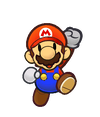
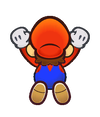
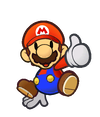
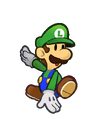
- The newly-added table for the SPM stylish moves needs images of the remaining stylish moves from that game, especially for Princess Peach and Bowser. Keep in mind that the remaining animations utilize the character's 3D models, and are not pre-rendered poses like the other images in the table.
- The newly-added table in the Super Paper Mario section very likely has at least one image assigned to the wrong move. There are also potentially multiple ways to achieve certain poses some of which add different point amounts to the stylish move score, see here. These errors should be identified and fixed accordingly.
Requested improvements must be clear, pertinent, and well-formed. Please refrain from adding bullet points such as "Add more information" or "Write the rest of the article".
- This article is about the moves in Paper Mario: The Thousand-Year Door and Super Paper Mario. For the moves in Super Mario Run, see Coin Rush (Super Mario Run).
- “Just press
 with perfect timing during an attack to pull off a Stylish move! If you do it right, the crowd will just go nuts! And some attacks have multiple ones!”
- —Eddy the Mask, Paper Mario: The Thousand-Year Door
Stylish moves, also referred to as Stylish commands, are extra commands in Paper Mario: The Thousand-Year Door and Super Paper Mario that accompany most attacks in the game.
Paper Mario: The Thousand-Year Door[edit]
In Paper Mario: The Thousand-Year Door, to perform a Stylish move, the player must press at a certain time during an attack.
When a Stylish move is successfully executed, it will excite the crowd in front of the battle stage, which causes them to provide more Star Power than a normal Action Command.
Stylish moves can only be performed when using a standard attack or an attack provided via a Badge, and cannot be performed when attacking via a item, Crystal Star, or any sort of counterattack, such as a Superguard. Some attacks have multiple Stylish moves.
In the original GameCube version of the game, the only ways to learn the correct timing for Stylish moves are to use the Timing Tutor badge sold by Charlieton or talk to Eddy the Mask in the town located in Rogueport Underground. In the Nintendo Switch remake, it is also possible to learn the timing for Stylish moves by talking to the Battle Master and practicing the appropriate move.
Mario's Stylish moves[edit]
| Attack
|
Stylish move
|
# of Moves
|
Effect
|
| Jump
|
Press at the high point of Mario's second jump, then again at the high point after he jumps on the enemy a second time. In order to execute the second Stylish move, the player has to press when Mario lands on an enemy the second time.
|
2
|
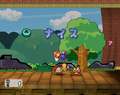
Mario lays back and gives a thumbs upMedia:PMTTYD-Stylish Jump Japan.png in the original Japanese version while Mario belly flops onto the enemy for the second jump and belly flopsMedia:PMTTYD-Stylish Jump Int.png in the international version.
|
| Spin Jump
|
Press when Mario is jumping towards the enemy.
|
1
|
Mario forward somersaults during the jump.
|
| Spring Jump
|
Press after bouncing on the enemy twice.
|
1
|
Mario bellyflops on to the ground. This Stylish move does not give much Star Power.
|
| Multibounce
|
Press at the height of each of Mario's bounces
|
No. of foes - 1
|
Mario either belly flops onto the next enemy or kicks while jumping.
|
| Power Bounce
|
Same as Multibounce
|
Unlimited
|
Same as Multibounce, though tougher to pull off.
|
| Power Jump
|
Same as Spin Jump, except no Spin Move (below)
|
1
|
Same as Spin Jump
|
| Shrink Stomp
|
Same as Jump
|
2
|
Same as Jump
|
| Sleepy Stomp
|
Same as Jump
|
2
|
Same as Jump
|
| Soft Stomp
|
Same as Jump
|
2
|
Same as Jump
|
| Tornado Jump
|
Press when Mario is falling back to the ground and again when he returns to his position.
|
2
|
Mario cartwheels back to his side of the battlefield, then confetti comes down. If the second command is attempted early and failed, the Star Power will not be awarded until after the player's next move (this includes changing partners with Quick Change equipped).
|
| Attack
|
Stylish move
|
# of Moves
|
Effect
|
| Hammer
|
Press immediately after Mario strikes the enemy and when Mario lands.
|
2
|
Mario backward somersaults and makes confetti appear when he lands.
|
| Super Hammer
|
After hitting the enemy, press on Mario's fifth spin.
|
1
|
Mario gives the audience a thumbs-up after he swings his hammer.
|
| Ultra Hammer
|
Same as Super Hammer
|
1
|
Same as Super Hammer
|
| Power Smash
|
Press immediately after Mario strikes the enemy and each time Mario lands on the ground.
|
4
|
Mario performs a series of backwards somersaults that get higher. For the final move, confetti comes down.
|
| Fire Drive
|
Press right after Mario hits the fireball. The player wants to press before the fireball reaches the top of its arc.
|
1
|
Mario spins in place and gives the audience a thumbs-up.
|
| Hammer Throw
|
Press right after Mario throws the hammer, then as he touches the ground. The player wants to press for the first Stylish move before the hammer reaches the top of its arc.
|
2
|
Mario forward somersaults and makes confetti appear when he lands.
|
| Head Rattle
|
Same as Hammer
|
2
|
Same as Hammer
|
| Ice Smash
|
Same as Hammer
|
2
|
Same as Hammer
|
| Piercing Blow
|
Same as Power Smash
|
4
|
Same as Power Smash
|
| Quake Hammer
|
Press when Mario is upright after Quake Hammer, before he moves.
|
2
|
One high backward somersault, then confetti comes down.
|
Partners' Stylish moves[edit]
Goombella[edit]
| Attack
|
Partner
|
Stylish move
|
# of Moves
|
Effect
|
| Headbonk
|
Goombella
|
Press when she stops walking towards the enemy.
|
1
|
Forward flips as she jumps towards the enemy.
|
| Tattle
|
Goombella
|
Press right after the Action Command.
|
1
|
Same as Rally Wink
|
| Multibonk
|
Goombella
|
Press when she stops walking towards the enemy, then again at the apex of her first jump.
|
2
|
A forward flip when jumping, then another if second command is performed correctly.
|
| Rally Wink
|
Goombella
|
Press just after the heart appears around Mario.
|
1
|
Hops in place with excitement.
|
| Attack
|
Partner
|
Stylish move
|
# of Moves
|
Effect
|
| Shell Toss
|
Koops
|
Press right after hitting the enemy, then again when his spinning begins to slow.
|
2
|
Koops spins upside down, then points up at the ceiling.
|
| Power Shell
|
Koops
|
Press when Koops returns to his position and again after he spins three times.
|
2
|
First Koops spins on his head, then points at the ceiling.
|
| Shell Shield
|
Koops
|
Press just before the shell lands on Mario.
|
1
|
Koops waves at the audience. This Stylish move is similar to his appeal animation.
|
| Shell Slam
|
Koops
|
Same as Power Shell.
|
2
|
Same as Power Shell.
|
Madame Flurrie[edit]
| Attack
|
Partner
|
Stylish move
|
# of Moves
|
Effect
|
| Body Slam
|
Flurrie
|
Press just as Flurrie touches the ground.
|
1
|
Points her little finger up.
|
| Gale Force
|
Flurrie
|
Press just after Flurrie stops blowing.
|
1
|
Same as Body Slam
|
| Lip Lock
|
Flurrie
|
Press right after the kiss.
|
1
|
Same as Body Slam
|
| Dodgy Fog
|
Flurrie
|
Press right when the fog appears.
|
1
|
Same as Body Slam
|
Yoshi Kid[edit]
| Attack
|
Partner
|
Stylish move
|
# of Moves
|
Effect
|
| Ground Pound
|
Yoshi Kid
|
Press when he is just above the enemy but when the bar is still shown and then again just before the Yoshi Kid returns to the ground.
|
2
|
Extra backward somersaults before the Yoshi Kid ground pounds, then jumps happily before moving back to Mario's side.
|
| Gulp
|
Yoshi Kid
|
Press after the enemy is released.
|
1
|
Same as Ground Pound's second stylish move.
|
| Mini-Egg
|
Yoshi Kid
|
Press after the last egg is thrown. The player wants to press as the last egg hits an enemy.
|
1
|
Same as Ground Pound's second stylish move.
|
| Stampede
|
Yoshi Kid
|
Press when the musical note appears next to him.
|
1
|
Same as Ground Pound's second stylish move.
|
| Attack
|
Partner
|
Stylish move
|
# of Moves
|
Effect
|
| Shade Fist
|
Vivian
|
Press right when Vivian reemerges on Mario's side.
|
1
|
Same as Fiery Jinx
|
| Veil
|
Vivian
|
Press after she unveils and is returning to her position.
|
1
|
Same as Fiery Jinx. Gives very little Star Power.
|
| Fiery Jinx
|
Vivian
|
Press right as Vivian points her finger.
|
1
|
Vivian clasps her hands together and smiles.
|
| Infatuate
|
Vivian
|
Press right after pressing for each heart. The player wants to press when they see a heart appearing next to Vivian.
|
No. of foes
|
Same as Fiery Jinx
|
Admiral Bobbery[edit]
| Attack
|
Partner
|
Stylish move
|
# of Moves
|
Effect
|
| Bomb
|
Bobbery
|
Press when Bobbery lands back on Mario's side of the field.
|
1
|
Salutes the sky.
|
| Bomb Squad
|
Bobbery
|
Press when the third bomb is at the top of its arc.
|
1
|
Same as Bomb. Gives very little Star Power.
|
| Hold Fast
|
Bobbery
|
Press as the word "NICE," "GOOD," or "GREAT" appears.
|
1
|
Same as Bomb
|
| Bob-ombast
|
Bobbery
|
Same as Bomb
|
1
|
Same as Bomb
|
Ms. Mowz[edit]
| Attack
|
Partner
|
Stylish move
|
# of Moves
|
Effect
|
| Love Slap
|
Ms. Mowz
|
Press as Ms. Mowz is walking back to Mario's side.
|
1
|
Hops once when the player presses . Gives very little Star Power.
|
| Kiss Thief
|
Ms. Mowz
|
Press when Ms. Mowz is walking towards the enemy.
|
1
|
Does a quick somersault and winks towards the audience. The wink is given more emphasis in the Nintendo Switch remake.
|
| Tease
|
Ms. Mowz
|
Press as Ms. Mowz is jumping back onto the ground after the attack.
|
1
|
Same as Kiss Thief.
|
| Smooch
|
Ms. Mowz
|
Press right after the kiss. The player wants to press when the hearts appear around Mario.
|
1
|
Same as Kiss Thief.
|
Super Paper Mario[edit]
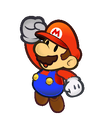
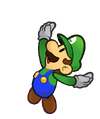
In Super Paper Mario, Stylish moves return with slightly different functionality. Due to the absence of Star Power in this game, stylish moves instead serve to give the player more points, and thus level up a little faster. All characters now use the same inputs to perform stylish moves, which generally involve shaking the Wii Remote in some way. Stylish moves can only be performed after jumping on an enemy, and cannot be done when attacking via an item, Pixl, or Bowser's Fire Breath. The player can chain stylish moves in this game, going from "Nice" to "Good" to "Great" to "Wonderful" to "Excellent", the higher the ranking is, the more points the player will receive from the action, but if the player takes damage or lands on the ground, the streak will reset.
| Technique
|
Mario
|
Peach
|
Bowser
|
Luigi
|
| Push Wii Remote forward
|
|

|
|

|
| Push Wii Remote backwards
|
|
|
|
|
| Push Wii Remote downwards
|
|
|
|
|
| Tilt Wii Remote left and right 3 times
|
|
|
|
|
| Tilt Wii Remote slightly clockwise and back to normal position
|
|
|
|
|
| Tilt Wii Remote slightly counterclockwise and back to normal position
|
|
|
|
|
Gallery[edit]
Paper Mario: The Thousand Year Door (International)
Multimedia[edit]
- Help:Media file • Having trouble playing?
Names in other languages[edit]
| Language | Name | Meaning | Note(s) | Ref. |
|---|
| Japanese | アクロバット技
Akurobatto-waza | Acrobatic techniques | | [1] |
| Chinese | 特技
Tèjì (Mandarin) | Special ability | | [2][3] |
| Dutch | Fraaie acties | Nice actions | | [4] |
| French (Canada) | Commande Style | Style command | | [5] |
| German | Trick-Kommando | Trick Command | | [6] |
| Italian | Tecnica con stile | Stylish technique; literally "technique with style". | | [7] |
| Korean | 곡예 기술의
Gog'ye gisur-ui | Acrobatic techniques | | [8] |
| Spanish (Latin America) | Técnicas acrobáticas | Acrobatic techniques | | [9] |
- In the original Japanese version of The Thousand-Year Door some Stylish moves are missing. For example, there is no second Stylish after a normal jump.
- In the demo disc for Paper Mario: The Thousand Year Door, when Mario or any of his partners make a stylish move, 'STYLE' is shown instead of 'STYLISH!'
References[edit]
- ^ 「アクロバット技の コマンドを 入力する タイミングが わかるようになる」– May 23, 2024. Timing Tutor's description in Paper Mario: The Thousand-Year Door for Nintendo Switch. Nintendo (Japanese). Retrieved July 17, 2026.
- ^ 「可以看到發動特技的指令輸入時機。」– May 23, 2024. Timing Tutor's description in Paper Mario: The Thousand-Year Door for Nintendo Switch. Nintendo (Traditional Chinese). Retrieved July 17, 2026.
- ^ "可以看到发动特技的指令输入时机。" – May 23, 2024. Timing Tutor's description in Paper Mario: The Thousand-Year Door for Nintendo Switch. Nintendo (Simplified Chinese). Retrieved July 17, 2026.
- ^ "Leer de timing voor fraaie acties." – May 23, 2024. Timing Tutor's description in Paper Mario: The Thousand-Year Door for Nintendo Switch. Nintendo (Dutch). Retrieved July 17, 2026.
- ^ « Permet de savoir quand utiliser la commande Style! » – May 23, 2024. Timing Tutor's description in Paper Mario: The Thousand-Year Door for Nintendo Switch. Nintendo (Canadian French). Retrieved July 17, 2026.
- ^ „Zeigt das Timing für das Trick-Kommando an.“ – May 23, 2024. Timing Tutor's description in Paper Mario: The Thousand-Year Door for Nintendo Switch. Nintendo (German). Retrieved July 17, 2026.
- ^ «Indica quando usarre i comandi per eseguire una tecnica con stile.» – May 23, 2024. Timing Tutor's description in Paper Mario: The Thousand-Year Door for Nintendo Switch. Nintendo (Italian). Retrieved July 17, 2026.
- ^ "곡예 기술의 커맨드를 입력하는 타이밍을 알 수 있게 된다" – May 23, 2024. Timing Tutor's description in Paper Mario: The Thousand-Year Door for Nintendo Switch. Nintendo (Korean). Retrieved July 17, 2026.
- ^ "Muestra cuándo usar las técnicas acrobáticas." – May 23, 2024. Timing Tutor's description in Paper Mario: The Thousand-Year Door for Nintendo Switch. Nintendo (Latin American Spanish). Retrieved July 17, 2026.


 Paper Mario: The Thousand-Year Door (Japan only)
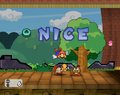 Paper Mario: The Thousand Year Door (International)

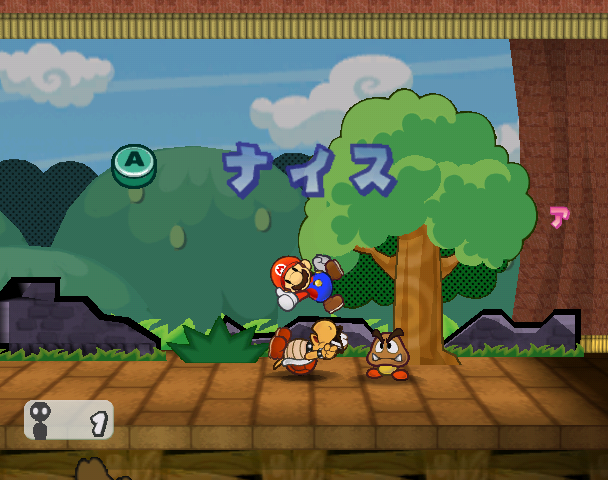
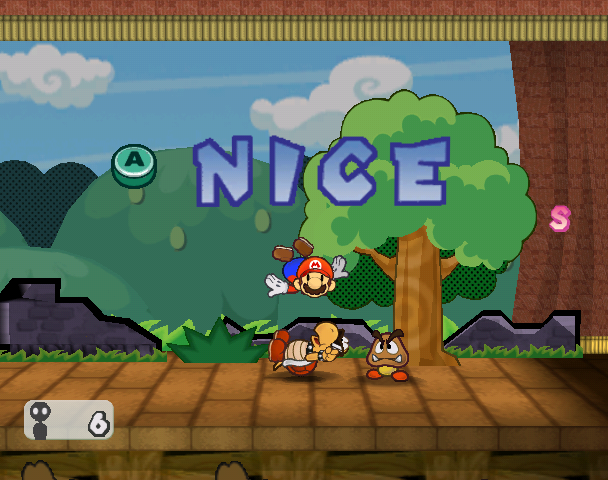
 Stylish move - Paper Mario: The Thousand-Year Door