Hello, Mario! (game)
| Hello, Mario! | |||||||||||||||||||||||||||
|---|---|---|---|---|---|---|---|---|---|---|---|---|---|---|---|---|---|---|---|---|---|---|---|---|---|---|---|
 English HOME Menu icon for Hello, Mario! | |||||||||||||||||||||||||||
| Publisher | Nintendo | ||||||||||||||||||||||||||
| Platforms | iOS (15 or later) Android (6.0 or later) Nintendo Switch (enhanced for Nintendo Switch 2) | ||||||||||||||||||||||||||
| Engine | Unity | ||||||||||||||||||||||||||
| Release dates |  August 26, 2025[1] August 26, 2025[1] February 19, 2026[2] February 19, 2026[2] February 19, 2026[3] February 19, 2026[3] February 19, 2026[4] February 19, 2026[4] February 19, 2026[5] February 19, 2026[5] February 19, 2026[6] February 19, 2026[6] | ||||||||||||||||||||||||||
| Languages | English (United States) English (United Kingdom) Japanese Chinese (Simplified) Chinese (Traditional) Dutch French (Canada) French (Europe) German Italian Korean Portuguese (Brazil) Portuguese (Europe) Russian Spanish (Latin America) Spanish (Europe) | ||||||||||||||||||||||||||
| Ratings | iOS/iPadOS: 4+ - Four years and older[7] Android: 3+ - Three years and older[8]
| ||||||||||||||||||||||||||
| Mode | Single player | ||||||||||||||||||||||||||
| Format |  Digital download Digital download Digital download Digital download | ||||||||||||||||||||||||||
| Input | Mobile devices: Touch controls | ||||||||||||||||||||||||||
 - Everyone
 - Three years and older
 - All ages
 - General audience
 - All ages
 - General
 - Three years and older
 - All ages
 - All ages

Hello, Mario! is a free application aimed towards young children released for iOS and Android devices[A] and the Nintendo Switch on August 26, 2025 in Japan and February 19, 2026 in other territories as part of the My Mario series. In the application, the player can interact with Mario's face by pulling it or turning it around on the screen, and Mario will react in various ways based on the player's input, in a similar fashion to Super Mario 64's title screen. An Internet connection is not required to play. On the Nintendo Switch, the application can be played only in handheld mode. A board book of the same name with similar interactive features was also released on the same day. When played on the Nintendo Switch 2, the game runs with an enhanced resolution and up to 120 frames per second on supported displays.
A similar app featuring Yoshi, titled Hello, Yoshi!, was announced on November 7, 2025, and was released on November 18, 2025 in Japan and on April 9, 2026 in other territories.
Overview[edit]
Upon starting the application, Mario's face appears from below the screen, with the player having to pull him up from his cap. The player can then interact with Mario in various ways, such as pulling on his facial features. They can also press, pull, or rotate parts of his face for some unique interactions. These interactions will be done automatically if the player leaves the game idle.
- Pulling up Mario's cap will remove it from Mario. A Blooper or Super Star will occasionally be present under the cap.
- Pulling both sides of Mario's mustache and letting them go will change the mustache's shape. These shapes consist of a curly mustache and a zigzag-shaped mustache, the latter of which greatly resembles Wario's mustache. Pulling the mustache down will instead make Mario raise an eyebrow and move his eyelids. Pressing on his mustache will either make Mario pull it with his hands or cause a comb to appear from above.
- Pulling Mario's ears will make him stick his tongue out. Pressing on his ears does the same, except Mario will pull his ears with his hands.
- Pulling both of Mario's eyebrows upwards will have him pretend to be determined or angry, while pulling them downwards will have him pretend to be upset. Pressing on his eyebrows does the same, except Mario will move his eyebrows with his hands.
- Pressing on Mario's nose several times will make him sneeze and sometime change the shape of his mustache. Doing so while Mario is enlarged by a Super Mushroom will cause either coins, Koopa Shells, or a single Super Mushroom to fall from the top of the screen. Pulling Mario's nose will instead make him bounce around the screen.
- Pressing on Mario's eyes will make sunglasses appear from above and land on Mario or make him play peekaboo with the player.
- Pressing on Mario's mouth will either make him whistle a note, blow a kiss, wave at the player, or stretch his mouth.
- Rotating Mario's face will make him dizzy. Sliding it while in this state will make Mario bounce around the screen and make bubbles appear, with some containing Goombas and Bob-ombs (as well as Green Shells and Cheep Cheeps if Mario is under the effects of a Super Star). Hitting the bubbles with Mario will increase a number. Hitting 100 bubbles makes one big bubble with confetti inside appear. After popping it, Mario congratulates the player.
- In the Nintendo Switch version, pressing the
 ,
,  ,
,  , or
, or  buttons or any of the
  directional buttons will play a sound effect, causing Mario's face to vibrate.
If the player has been playing for a while, Mario will become sleepy and they will not be able to play any longer unless they close and reopen the application, as a way to encourage children to take a break.[1] This can be disabled in the settings in the mobile version, or by holding  or
or  while holding
  or
or  when Mario's hat first appears on the bottom of the screen in the Nintendo Switch version.[21]
[edit]
On the top-left corner of the screen, the player can press on a ? Block icon to access the following options. Like the previous interactions, these will be done automatically if the player leaves the game idle.
- Mario: Allows the player to play peekaboo with Mario. A Boo occasionally makes an appearance. If the Boo gets close enough to Mario, it will steal his cap and fly away.
- ? Block: A ? Block appears on the screen. It can be touched to make coins come out. Sometime, it will also release a Super Mushroom or a Super Star.
- Super Mushroom: A Super Mushroom appears on screen. Giving it to Mario will make him bigger. This allows him to pop bubbles more easily while bouncing around the screen.
- Super Star: A Super Star will appear on screen and start circling around Mario. Giving it to him makes him invincible. This allows him to move faster while bouncing around the screen. If the player rotates the Super Star around Mario, it will instead result in Mario rotating and becoming dizzy.
- Warp Pipe: A Warp Pipe appears, which sucks Mario off the screen if he approaches it or if the pipe is pressed. Two scenarios can then happen: the player has to find Mario from one of three pipes, with the other two containing enemies, or a pipe will appear and shoot out Mario when touched.
- Blooper: A Blooper appears on screen and covers Mario in ink if pressed. Launching Mario around the screen while in this state will make him leave a trail of ink behind. A Blooper Nanny along with its Blooper Babies will appear if Mario is enlarged with a Super Mushroom. It can be defeated by giving Mario a Super Star or by pulling Mario's nose and launching him.
- Cheep Cheep: A Cheep Cheep appears and hits Mario, making him smaller. If Mario hits a bubble containing an enemy while in the small state, he will fly out of the screen, which will require the player to pull him up by his cap again. It can be defeated by giving Mario a Super Star or by pulling Mario's nose and launching him.
- Note Block: The background and music changes to an underwater background with "Underwater BGM" from Super Mario Bros., an enemy pattern background with "Title BGM" from Super Mario World, and the default blank background with "Ground BGM" from Super Mario Bros. Mario sings the intro of each music track when switching.
- Toad with camera: Toad appears on the bottom-left with a camera and a 3-second countdown starts, after which a screenshot of the screen is taken. The last-taken screenshot can be viewed by selecting it from the right of the ? Block menu.
References to other games[edit]
- Arrangements of "Ground BGM" and "Underwater BGM" are included as background tracks.
- Mario can whistle the first five notes of "Ground BGM".
- Mario can whistle "Player Down" from this game.
- Mario can whistle the sound for sliding down a flagpole from this game.
- Mario can whistle the 1-Up Jingle from this game.
- Mario can whistle the first two notes of "World 5 Map (Sky Land) - In the Sky" from this game.
- An arrangement of "Title BGM" is included as a background track.
- Mario can whistle Yoshi's Voice from this game.
- The player can interact with Mario's face in a way similar to the title screen of this game.
- The "good night" screen uses an arrangement of "Piranha Plant's Lullaby" as the background music.
- An arrangement of "Toad's Message" plays when the player uses the screenshot feature.
- An arrangement of "Star Catch Fanfare" plays when the player pops 100 Bubbles with Mario.
- The version of "Power-Down" heard in this game can be heard when Mario gets hit by a Cheep Cheep
- Mario can wear his sunglasses from this game.
- Mario Kart series
- The Blooper acts similarly to the games in this series, namely spraying Mario and the screen in ink.
- The first few notes of "The Toad Brigade" are quoted at the end of the arrangement of "Toad's Message".
- The menu sound effects from this game can be heard in the settings menu and when accepting the User Agreement.
- The version of "Power-Up" from this game can be heard when Mario collects a Super Mushroom or Super Star.
References in later games[edit]
- Hello, Mario! is the basis for Hello, Yoshi!, with minor changes and additions to accommodate for the main character of the game being Yoshi instead of Mario.
Gallery[edit]
Promotional images[edit]
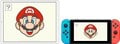
Hello, Mario! running on an iPad and Nintendo Switch
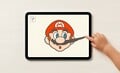
Mario's mustache being pulled on
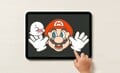
A Boo appearing during a game of peekaboo
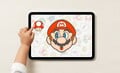
A Mushroom
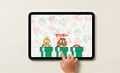
Warp Pipes with a Koopa Troopa, Goomba, and Mario inside

An underwater background with a Cheep Cheep and a faint image of a Blooper
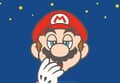
Mario becoming sleepy


Icons[edit]
Icon for the iOS and Android versions
English HOME Menu icon
Japanese HOME Menu icon
Alternate Japanese HOME Menu icon
Simplified Chinese HOME Menu icon

Traditional Chinese HOME Menu icon

Korean HOME Menu icon
Dutch/German HOME Menu icons
French HOME Menu icon
Italian HOME Menu icon
Spanish HOME Menu icon
Portuguese HOME Menu icon

Russian HOME Menu icon


Artworks[edit]

Underwater background
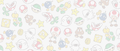
Pattern background


Sprites and models[edit]

White ? Block

Toad with a camera


Screenshots[edit]
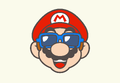
Mario wearing his sunglasses from Super Mario Sunshine
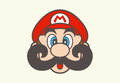
Mario with a large curly mustache
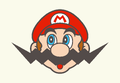
Mario with a zig-zag mustache resembling Wario
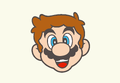
Mario without a cap


Names in other languages[edit]
| Language | Name | Meaning | Note(s) | Ref. |
|---|---|---|---|---|
| Japanese | かおマリオ Kao Mario |
Face Mario | [22] | |
| Chinese (Simplified) | 脸孔马力欧 Liǎnkǒng Mǎlì'ōu (Mandarin) Líhmhúng Máhlihk'āu (Cantonese) |
Face Mario | [23] | |
| Chinese (Traditional) | 臉孔瑪利歐 Liǎnkǒng Mǎlì'ōu (Mandarin) Líhmhúng Máhleih'āu (Cantonese) |
Face Mario | [23] | |
| Dutch | Hallo, Mario! | Hello, Mario! | [23] | |
| French (Canada) | Bonjour Mario! | Hello Mario! | [23] | |
| French (Europe) | Bonjour Mario ! | Hello Mario! | [23] | |
| German | Hallo, Mario! | Hello, Mario! | [23] | |
| Italian | Ciao, Mario! | Hello, Mario! | [23] | |
| Korean | 얼굴 마리오 Eolgul Mario |
Face Mario | [23] | |
| Portuguese | Olá, Mario! | Hello, Mario! | [23] | |
| Russian | Привет, Марио! Privet, Mario! |
Hello, Mario! | [23] | |
| Spanish | ¡Hola, Mario! | Hello, Mario! | [23] |
Footnotes and references[edit]
Footnotes[edit]
- ^ iOS 15 or Android 6.0 or later is required to play the app.
References[edit]
- ^ a b マイマリオ(MY MARIO) : かおマリオ(アプリ). Nintendo. Retrieved August 8, 2025.
- ^ Apps | Nintendo UK. Nintendo UK (British English). Retrieved February 18, 2026. (Archived February 18, 2026, 09:50:51 UTC via Wayback Machine.)
- ^ Apps | Nintendo ZA. Nintendo ZA. Retrieved February 18, 2026. (Archived February 18, 2026, 10:19:02 UTC via Wayback Machine.)
- ^ My Mario Apps and Games. Nintendo. Retrieved January 8, 2026. (Archived January 8, 2026, 16:06:47 UTC via Wayback Machine.)
- ^ ¡Hola, Mario! para Nintendo Switch - Sitio Oficial de Nintendo para Argentina. Nintendo Argentina. Retrieved February 19, 2026.
- ^ a b Olá, Mario! para Nintendo Switch - Site Oficial da Nintendo para Brasil. Nintendo Brazil. Retrieved February 19, 2026.
- ^ Hello, Mario! on the App Store. Apple - App Store Preview (English). Retrieved October 5, 2025.
- ^ Hello, Mario! - Apps on Google Play (Russia store). Google Play (English). Retrieved April 4, 2026.
- ^ Hello, Mario! - Apps on Google Play (U.S. store). Google Play (English). Retrieved October 5, 2025.
- ^ Hello, Mario! - Apps on Google Play (UK store). Google Play (English). Retrieved October 5, 2025.
- ^ Hello, Mario! - Apps on Google Play (Germany store). Google Play (English). Retrieved October 5, 2025.
- ^ Hello, Mario! - Apps on Google Play (Brazil store). Google Play (English). Retrieved October 5, 2025.
- ^ Hello, Mario! - Apps on Google Play (South Korea store). Google Play (English). Retrieved October 5, 2025.
- ^ Hello, Mario! - Apps on Google Play (Australia store). Google Play (English). Retrieved October 5, 2025.
- ^ Hello, Mario! - Apps on Google Play (Japan store). Google Play (English). Retrieved October 5, 2025.
- ^ Hello, Mario! for Nintendo Switch - Nintendo Official Site. Nintendo of America. Retrieved February 19, 2026. (Archived February 19, 2026, 06:57:32 UTC via Wayback Machine.)
- ^ かおマリオ | My Nintendo Store(マイニンテンドーストア). My Nintendo Store Japan (Japanese). Retrieved October 5, 2025.
- ^ Hello, Mario! | Nintendo Switch download software | Games | Nintendo UK. Nintendo UK. Retrieved February 19, 2026.
- ^ Hallo, Mario! | Nintendo Switch Download-Software | Spiele | Nintendo DE. Nintendo DE. Retrieved February 19, 2026.
- ^ ¡Hola, Mario! para Nintendo Switch - Sitio Oficial de Nintendo para Mexico. Nintendo Mexico. Retrieved February 19, 2026.
- ^ かおマリオ - My Nintendo Store(マイニンテンドーストア). Nintendo. Retrieved February 23, 2026.
- ^ August 8, 2025. My Mario, a series of Mario-themed products to be released from August 26, 2025. Nintendo Co., Ltd. (English). Retrieved August 8, 2025. (Archived August 8, 2025, 01:49:40 UTC via Wayback Machine.)
- ^ a b c d e f g h i j k Name of the Hello, Mario! software on Nintendo Switch.
External links[edit]

- English website
- English App Store page
- Google Play page
- Japanese website
- Japanese App Store page
- Demonstration of the app, recorded on YouTube by DanPar
| Hello, Mario! / Hello, Yoshi! | ||
|---|---|---|
| Main characters | Marioa • Yoshib • Yellow Yoshib • White Yoshib • Pink Yoshib • Light Blue Yoshib | |
| Forms | Super Mario • Small Mario • Invincible Mario | |
| Non-playable characters | Blooper • Blooper Nanny • Blooper Baby • Cheep Cheep • Bob-omb • Koopa Troopa • Toad • Boo • Goomba • Piranha Plant | |
| Items and power-ups | Super Mushroom • Coin • Comba • Fruitb • Mario's capa • Sunglasses • Super Star • Yoshi's Eggb • Koopa Shell | |
| Objects | ? Block • Bubble • Empty Block | |
| Music | "Ground BGM" • "The Toad Brigade" • "Title BGM" • "Toad's Message" • "Star Catch Fanfare" • "Underwater BGM" • "Piranha Plant's Lullaby" | |
| Further info | Hello, Mario! (book) • My Mario • My Mario (book series) | |
| Mobile games and applications | |
|---|---|
| Super Mario franchise | Super Mario Run (2016) • Dr. Mario World (2019) • Mario Kart Tour (2019) • Hello, Mario! (2025) • Hello, Yoshi! (2025) |
| Miscellaneous | Super Mario Run Stickers (2016) • 8-bit Super Mario Stickers (2017) • Nintendo Switch Parental Controls (2017) • Nintendo Switch App (formerly Nintendo Switch Online) (2017) • Yarn Yoshi & Poochy Stickers (2019) • LEGO Super Mario (2020) • Instax for Nintendo Switch (2021) • Nintendo Music (2024) • Nintendo Today! (2025) |

