MarioWiki talk:Image use policy
Rule change[edit]
- Images should be optimized and not exceed 5 megabytes in file size.
- Images' dimensions should be in the original size and never exceed 5000 pixels in width or height.
- Images cannot exceed an area of 12.5 million pixels or about 3500x3500 for a square image.
This rule should be changed because original, official artwork, namely, scenic artwork from recent games, such as this, this, this, this, this, this, this, and this must be resized according to that policy.
But I'm not sure why this rule is here. Is it for fair use or is it to prevent the wiki from carrying the burden of a large image?  It's me, Mario! (Talk / Stalk) 14:23, 23 February 2014 (EST)
- Maybe you can take this to the forums in the General Discussion topic?
 Xiahou Ba(the Nasty Warrior) 16:06, 23 February 2014 (EST)
- I think it would be very large. This wiki should only summarize the games, artworks are just an addition. PidgiWiki is an example of wikis that can contain any size of artworks.--15:43, 24 February 2014 (EST)

- I think it would be very large. This wiki should only summarize the games, artworks are just an addition. PidgiWiki is an example of wikis that can contain any size of artworks.--

- The rule is suspended until further notice. We might get serious on restrictions, but not necessarily those restrictions, and we don't want to have to resize everything twice. --Steve (talk)
 16:21, 24 February 2014 (EST)
MediaWiki Headers[edit]
I think this project page can be better organized with the use of MediaWiki headers instead of four bullet points with sub-bulletpoints. Something to the effect below. --Wildgoosespeeder (talk) (Stats - Contribs) 05:02, 8 February 2016 (EST)
- This would make the page neater, it's fine by me. --
 ™ The 'Shroom 22:08, 8 February 2016 (EST)
- I think it's unnecessary. There's only four points, so it's pretty straightforward to find what you're looking for, and the screenshots and aboutfile points really don't seem substantial enough for full sections. The fact that the whole page is currently a (relatively) compact list is also a good thing, since people tend to not want to read long, multi-faceted policy pages. - Walkazo 23:42, 8 February 2016 (EST)
- The headers would make the rules more clear and faster to identify. Nobody likes walls of text. My suggestion was to make it more visually appealing or at least a less daunting read. The other MarioWiki pages use headers. --Wildgoosespeeder (talk) (Stats - Contribs) 01:32, 9 February 2016 (EST)
- I have decided to create a sandboxed version of this page to show what changes I am looking to implement: User:Wildgoosespeeder/MarioWiki:Image Use Policy --Wildgoosespeeder (talk) (Stats - Contribs) 20:24, 9 July 2016 (EDT)
- The headers would make the rules more clear and faster to identify. Nobody likes walls of text. My suggestion was to make it more visually appealing or at least a less daunting read. The other MarioWiki pages use headers. --Wildgoosespeeder (talk) (Stats - Contribs) 01:32, 9 February 2016 (EST)
- I think it's unnecessary. There's only four points, so it's pretty straightforward to find what you're looking for, and the screenshots and aboutfile points really don't seem substantial enough for full sections. The fact that the whole page is currently a (relatively) compact list is also a good thing, since people tend to not want to read long, multi-faceted policy pages. - Walkazo 23:42, 8 February 2016 (EST)
Cropping Letterboxing Mandated[edit]
Porplemontage (talk) and I have been talking about the quality of our image uploads and we are quite split if mandating cropping is a good idea. I suggest reading the talk page section (User talk:Porplemontage#RE:Image black borders) to get an idea where our stances are with it. Thoughts? --Wildgoosespeeder (talk) (Stats - Contribs) 03:30, 3 May 2016 (EDT)
- How to cut this:
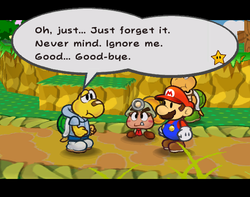
- I tried it with MS Paint and the resulting pic looks pretty "incomplete". A gossip-loving Toad (Talk) 21:53, 5 May 2016 (EDT)
- I'm not too keen on cropping screenshots as I said before but I can make exceptions if it is trying to zoom in on something, such as the Thorny Flower first picture. --Wildgoosespeeder (talk) (Stats - Contribs) 23:07, 5 May 2016 (EDT)

1) Completely empty black border: crop out completely to the edge of the active image, every time (well, with the sole exception of "if the black border is part of the point' of uploading the image"). 2) Black border with text box impinging - case by case, but the general rule should be to crop roughly to the edge of the text box (not the text itself), including any black border visible against the active image.
So in the case of File:Koops shyness.png, this:

would be my default. Although this is a case where you can get away with cropping all the way to the edge of the active image and it looks okay (sometimes, there's text either right on the edge of the black border, or actually inside it).
*previews, is surprised it actually embeds the imgur image, changes to linked thumbnail* - Reboot (talk) 23:23, 5 May 2016 (EDT)
- But that crop just looks even more odd than cropping Paper Mario images. --Wildgoosespeeder (talk) (Stats - Contribs) 00:20, 6 May 2016 (EDT)
- This (right) doesn't look odd to me.
- Remember that the Paper Mario screen area was allowing for 10%ish overscan. The average player simply would not have seen most (or even all in some cases) of the black area. - Reboot (talk) 00:39, 6 May 2016 (EDT)
- The case on the right: I'd like to see the remaining black border part made transparent. A gossip-loving Toad (Talk) 01:05, 6 May 2016 (EDT)
- But that crop just looks even more odd than cropping Paper Mario images. --Wildgoosespeeder (talk) (Stats - Contribs) 00:20, 6 May 2016 (EDT)
- I see the black border on my HDTV playing the game on real hardware through composite video. --Wildgoosespeeder (talk) (Stats - Contribs) 15:08, 6 May 2016 (EDT)
- Now try watching it on a 2000-era (say, bought in 1997 or 1998) CRT television. - Reboot (talk) 18:30, 6 May 2016 (EDT)
- I'm not entirely sure we can rely on that because Nintendo did put in a "Screen Position" setting on the GameCube and Wii to correct any off-center screen positioning due to possible manufacturing defects of those CRT TVs. I know that has nothing to do with Paper Mario but it should shed light for CRT TVs. I had to use this setting to correct my old Toshiba CRT TV before I went to a Vizio HDTV. Also how a CRT TV processes input varies from TV to TV. With an HDTV, they are pretty consistent displaying correctly. --Wildgoosespeeder (talk) (Stats - Contribs) 18:57, 6 May 2016 (EDT)
- ...that lack of consistency and presence of overscan is the entire point I was making. Yes, LCD TVs are more consistent. With Paper Mario, they were playing to the lowest common denominator of 4:3 CRT viewable area (so did other games in terms of "safe" picture area. It was just that PM blacked out the "unsafe" area rather than putting non-essential graphics there). - Reboot (talk) 12:01, 8 May 2016 (EDT)
- I'm not entirely sure we can rely on that because Nintendo did put in a "Screen Position" setting on the GameCube and Wii to correct any off-center screen positioning due to possible manufacturing defects of those CRT TVs. I know that has nothing to do with Paper Mario but it should shed light for CRT TVs. I had to use this setting to correct my old Toshiba CRT TV before I went to a Vizio HDTV. Also how a CRT TV processes input varies from TV to TV. With an HDTV, they are pretty consistent displaying correctly. --Wildgoosespeeder (talk) (Stats - Contribs) 18:57, 6 May 2016 (EDT)
- Now try watching it on a 2000-era (say, bought in 1997 or 1998) CRT television. - Reboot (talk) 18:30, 6 May 2016 (EDT)
- I see the black border on my HDTV playing the game on real hardware through composite video. --Wildgoosespeeder (talk) (Stats - Contribs) 15:08, 6 May 2016 (EDT)
I'm good with cropping right across the top (1). Transparency is an interesting idea. --Steve (talk) 01:16, 6 May 2016 (EDT)
- Like I said, you can get away with it with that image and it looks fine, but not in every case. The Paper Mario ones cut the dialogue too close to the top for that to look okay (note that the Battle HUD - File:PMBowserBattle1.png - has a 202-height active area as well). I've edited Koopa Bros. Toad.png (right) to have those two partially-surviving rows of black pixels be transparent - it looks fine, but it's more work to do. - Reboot (talk) 07:45, 6 May 2016 (EDT)

Well, if the screenshot is put on articles at the original size, that the transparent part by the top side of the picture will show as white. Since we have #f9f9f9 frames for pictures, If the picture has dark colors, this will make a "light gray--white--dark" contrast, which does not look good in my opinion. Thoughts? A gossip-loving Toad (Talk) 11:27, 9 July 2016 (EDT)
- We gotta keep thumb's background white so transparent character artwork looks good, so it's good. --Steve (talk) 18:12, 9 July 2016 (EDT)
- Something I was wondering about the other day in relation to this sprite - is there an extension or something that would allow the background colour to be specified for an image? (A syntax something like [[File:file.ext|100px|bgcolor=black]].) - Reboot (talk) 18:20, 9 July 2016 (EDT)

Here is another issue: Super Paper Mario dialog boxes are the same black as the letterboxing and borders! --Wildgoosespeeder (talk) (Stats - Contribs) 18:50, 26 May 2016 (EDT)
- Only if you have your Wii set to narrowscreen/4:3. If you have it set to widescreen, there's no letterboxing. - Reboot (talk) 15:56, 28 May 2016 (EDT)
- The image to the right needs to be recaptured anyways. That isn't my screenshot though. That's been there longer than I have been contributing (November 2015 even though I registered in 2010). Even with that said, I think the game controls the letterboxing on the top and bottom of the screens by inserting it when triggering a dialog sequence then makes it disappear when resuming control of the player character. The left and right letterboxing isn't supposed to be there. Bad cropping on the uploader's part. Here's what widescreen Super Paper Mario is supposed to look like: File:Hammer Whacker.PNG --Wildgoosespeeder (talk) (Stats - Contribs) 15:59, 28 May 2016 (EDT)
- ...that's not Super Paper Mario.
- And I have Super Paper Mario running, on a Wii, right beside me. The game is not letterboxing, either in cutscenes or in gameplay. - Reboot (talk) 16:06, 28 May 2016 (EDT)
- Unless I am thinking that Paper Mario: The Thousand-Year Door has that letterbox control. It's been a little while since I last played through the story and got the exact point the right picture is referencing. The image I linked to is from Super Paper Mario. It was taken from Flipside Arcade. --Wildgoosespeeder (talk) (Stats - Contribs) 16:14, 28 May 2016 (EDT)
- Okay, but it still isn't representative of the general UI/etc.
- This is a photo, not a screenshot, but it shows what happens when you trigger a dialogue sequence with widescreen engaged. No borders (all the black is the actual bezel of the TV and beyond - I turned the light out to take the picture): http://imgur.com/j6W1TxX - Reboot (talk)
- I think what I was trying to say about the Flipside Arcade image was what the widescreen mode looks like dimensionally so that way you can see if the game inserts letterboxing like I know Paper Mario: The Thousand-Year Door does. So would you require widescreen screenshots of Super Paper Mario so we don't have to put up with this odd cropping or transparency of screenshots? 4:3 screenshots are just as valid for this Wiki. --Wildgoosespeeder (talk) (Stats - Contribs) 17:58, 29 May 2016 (EDT)
- Require widescreen (which, since they don't waste a big chunk of the screen with empty black letterboxing, are automatically higher-resolution!). Besides, per the directive that started this discussion, the letterboxed ones *are* less valid than unletterboxed widescreen! (Direct comparisons notwtithstanding) - Reboot (talk) 18:51, 29 May 2016 (EDT)
- I think what I was trying to say about the Flipside Arcade image was what the widescreen mode looks like dimensionally so that way you can see if the game inserts letterboxing like I know Paper Mario: The Thousand-Year Door does. So would you require widescreen screenshots of Super Paper Mario so we don't have to put up with this odd cropping or transparency of screenshots? 4:3 screenshots are just as valid for this Wiki. --Wildgoosespeeder (talk) (Stats - Contribs) 17:58, 29 May 2016 (EDT)
- Unless I am thinking that Paper Mario: The Thousand-Year Door has that letterbox control. It's been a little while since I last played through the story and got the exact point the right picture is referencing. The image I linked to is from Super Paper Mario. It was taken from Flipside Arcade. --Wildgoosespeeder (talk) (Stats - Contribs) 16:14, 28 May 2016 (EDT)
- The image to the right needs to be recaptured anyways. That isn't my screenshot though. That's been there longer than I have been contributing (November 2015 even though I registered in 2010). Even with that said, I think the game controls the letterboxing on the top and bottom of the screens by inserting it when triggering a dialog sequence then makes it disappear when resuming control of the player character. The left and right letterboxing isn't supposed to be there. Bad cropping on the uploader's part. Here's what widescreen Super Paper Mario is supposed to look like: File:Hammer Whacker.PNG --Wildgoosespeeder (talk) (Stats - Contribs) 15:59, 28 May 2016 (EDT)

Super Mario Galaxy dialogs for sure have an issue. The dialog box is translucent (alpha channel has a value somewhere between 0 and 255, which perfect transparency has a value of 255 for each pixel). Cropping would be wrong because it loses consistency with the rest of the dialog box and picture. Transparency is also wrong because part of the letterboxing is preserved caused by the overlapping translucent dialog box. How do we accommodate that? Also, we need to make sure we capture at native resolution (not always 854x480 or 640x480) because there is some filtering and blur applied to the rounded edges of the dialog box as well. Native resolution would likely not have this. Currently, that isn't accurate to take native resolution screenshots of Wii games at this current time. --Wildgoosespeeder (talk) (Stats - Contribs) 01:59, 16 June 2016 (EDT)
- Wildgoosespeeder: Border back but only for a few seconds. I still don't like the policy but I think if I upload two versions of the image, I won't have such a gripe with the policy.
...seriously?
No, I mean, SERIOUSLY?!? This coming from the PNG monster? - Reboot (talk) 17:39, 9 July 2016 (EDT)
- No need to be disrespectful when addressing someone. Anyways, what does PNG Monster have to do with cropping screenshots? That's just a program to reduce file size of PNGs (doesn't affect the contents of the image). --Wildgoosespeeder (talk) (Stats - Contribs) 18:04, 9 July 2016 (EDT)
- I really didn't like the Paper Mario images due to the four large and uneven black borders. The Mario Galaxy images are fine, I'll update the policy so you can leave them as they are. --Steve (talk) 18:12, 9 July 2016 (EDT)
- The rules you have decided months ago and updated moments ago don't really make a whole lot of sense to me. It's hard to come up with a uniform rule that fits each game nicely. That's why I have been questioning your decision. This is why I just upload an uncropped screenshot. Far easier. --Wildgoosespeeder (talk) (Stats - Contribs) 18:35, 9 July 2016 (EDT)
- It's pretty simple. The way that the Paper Mario images were cropped before your re-uploads was good. I didn't like the new black borders. The whole policy change was just a way to make those images look the way they used to, except of course with the better quality retained. Got it? --Steve (talk) 19:10, 9 July 2016 (EDT)
- But why are you excusing Super Mario Galaxy from this rule? I'll just list the cons of cropping off the borders:
- It's pretty simple. The way that the Paper Mario images were cropped before your re-uploads was good. I didn't like the new black borders. The whole policy change was just a way to make those images look the way they used to, except of course with the better quality retained. Got it? --Steve (talk)
- Not what real hardware produces, which is part of the image policy. The image is edited if cropped, so {{aboutfile}} should reflect this change. If it is not mentioned, it's misleading. Then I will be OK with cropping.
- This could make galleries in {{galleries}} look kind of off when displaying screenshots. The title screen of Paper Mario is 320x237 while the game play screenshots are less than that. This can make pages using {{multiple image}} look weird and off as well. --Wildgoosespeeder (talk) (Stats - Contribs) 19:31, 9 July 2016 (EDT)
- The general rule is that we don't crop, which Mario Galaxy follows. Think of Paper Mario as an exception to this rule, due to how terrible four large black and uneven borders look. It looks worse than your cited gallery problem, in my humble opinion. So note the crop in aboutfile line #4. --Steve (talk) 19:44, 9 July 2016 (EDT)
So note the crop in aboutfile line #4
- Make it part of the policy? Then I will be much more satisfied with this policy change.
If the screenshot needs to be cropped to remove black borders or have transparency be added if a game element overlaps the black border, note it in {{aboutfile}}, parameter 4.
--Wildgoosespeeder (talk) (Stats - Contribs) 19:52, 9 July 2016 (EDT)
- I don't think it is necessary to mention cropping in #4, for the same reason Wikisource doesn't mention that it has "changed" the font or the layout of the original documents. A gossip-loving Toad (Talk) 02:34, 17 July 2016 (EDT)
- But it is a modification of the unaltered screenshot (or image that gets cropped). It should be documented if such an edit takes place. --Wildgoosespeeder (talk) (Stats - Contribs) 02:44, 17 July 2016 (EDT)
- It is a modification of the .png file output by the emulator, but what if you don't use the emulator's "screenshot" feature, but instead use the "Snipping Tool" that comes from Windows 7+? In the latter case, the borderless screenshot isn't modified at all. A gossip-loving Toad (Talk) 03:49, 17 July 2016 (EDT)
- You should be using the emulator's screenshot button. The reason is that it reads what the real output is (it's usually as close as possible to the real hardware's output). Only in odd cases should you use the snipping tool (or equivalent methods). I have had issues with MESSUI emulating CD-i using its screenshot button, but the screen resolution is always 384x280 for the Mario games we cover (including the letterboxing that should be cropped), so properly setting up MESS for the snipping tool fixes the issue. Other than that, just mention you use the snipping tool so that way if someone stumbles across your upload and it says so, they can compare with a non snipping tool screenshot of theirs to judge if
a new uploadtagging as cropped is required. Just out of curiosity, why do you use the snipping tool? Something wrong with BizHawk, similar to MESS? If so, show me a screenshot generated by BizHawk. --Wildgoosespeeder (talk) (Stats - Contribs) 04:20, 17 July 2016 (EDT)- No, I don't use the snipping tool at all. But just as people have the freedom to choose what operating system to use to contribute to the encyclopedia -- Windows, Linux, Mac, etc. -- they should also have the freedom to choose how they take their screenshots, as long as they're of the same quality. What I'm worrying about is that snipping tool users will be compelled to act as if they were using the emulator method, even if they have done no modification at all. (Indeed, one of the great advantages of snipping tools is that you don't need to crop, if it's properly set up.) A gossip-loving Toad (Talk) 09:31, 17 July 2016 (EDT)
- [Note: I tried both methods of taking a Paper Mario screenshot and they're indeed of the same quality. A gossip-loving Toad (Talk) 10:00, 17 July 2016 (EDT)]
- [Another note: cropping is not editing the content of the screenshot. It isn't misleading either because the average readers of MarioWiki are players and look at screenshots to know what is on the screen, not how big the screen is or how much the screenshot differs from real hardware output. A gossip-loving Toad (Talk) 12:36, 17 July 2016 (EDT)]
- Real hardware doesn't crop. I trust the emulator screenshot button. I checked the NES, SNES, N64, GCN, and Wii and they relatively match. Therefore, cropping the image for MarioWiki is editing the screenshot. --Wildgoosespeeder (talk) (Stats - Contribs) 15:18, 17 July 2016 (EDT)
- You should be using the emulator's screenshot button. The reason is that it reads what the real output is (it's usually as close as possible to the real hardware's output). Only in odd cases should you use the snipping tool (or equivalent methods). I have had issues with MESSUI emulating CD-i using its screenshot button, but the screen resolution is always 384x280 for the Mario games we cover (including the letterboxing that should be cropped), so properly setting up MESS for the snipping tool fixes the issue. Other than that, just mention you use the snipping tool so that way if someone stumbles across your upload and it says so, they can compare with a non snipping tool screenshot of theirs to judge if
- It is a modification of the .png file output by the emulator, but what if you don't use the emulator's "screenshot" feature, but instead use the "Snipping Tool" that comes from Windows 7+? In the latter case, the borderless screenshot isn't modified at all. A gossip-loving Toad (Talk) 03:49, 17 July 2016 (EDT)
- But it is a modification of the unaltered screenshot (or image that gets cropped). It should be documented if such an edit takes place. --Wildgoosespeeder (talk) (Stats - Contribs) 02:44, 17 July 2016 (EDT)
I still don't agree. First, there isn't a rule in the image policy that says the hardware output is the only "correct" version of a screenshot and whatever disagrees with it is inauthentic. Second, the purpose of having screenshots on the wiki is to show the reader what is on the scene. It is only on a wiki like The Cutting Room Floor that being faithful to the hardware is important. A gossip-loving Toad (Talk) 15:36, 17 July 2016 (EDT)
- Hey, wait a minute -- it isn't my goal to argue whether cropping qualify as modification, and I was arguing over that like an idiot. All I ask is that people should be allowed to upload borderless Paper Mario screenshots without saying that they have "cropped" the picture in #4, since it is possible that they are honest. A gossip-loving Toad (Talk) 15:53, 17 July 2016 (EDT)
- I guess it is possible that there are people that don't know any better. My WIP screenshot guide is my attempt to better inform screenshot submitters the expected output of an emulator screenshot. If it matches, it's valid. Once validated, it can then be cropped, if necessary, as deemed by the policy. My WIP hasn't been modified to reflect the recent change in policy. Not sure of the best way to word it. --Wildgoosespeeder (talk) (Stats - Contribs) 17:43, 17 July 2016 (EDT)
- But what about snipping tool users? Why are you ignoring their feeling? A gossip-loving Toad (Talk) 23:04, 17 July 2016 (EDT)
Another problem is that it compels the editors to think that cropping is modification, whether they agree or not.A gossip-loving Toad (Talk) 23:30, 17 July 2016 (EDT)- Again, the intention of my WIP is to inform everyone submitting screenshots of expected outputs of emulator-taken screenshots, even snipping tool users. Snipping tool users should say they used the tool in the edit field. Doesn't matter if you agree cropping is editing. By definition alone, cropping is editing. It's like YouTubers video editing to zoom in or edit junk out of the raw footage or pictures they choose to include in their videos. --Wildgoosespeeder (talk) (Stats - Contribs) 23:43, 17 July 2016 (EDT)
- Snipping tool users should say they used the tool in the edit field.
- OK, Now I feel better! A gossip-loving Toad (Talk) 23:53, 17 July 2016 (EDT)
- Again, the intention of my WIP is to inform everyone submitting screenshots of expected outputs of emulator-taken screenshots, even snipping tool users. Snipping tool users should say they used the tool in the edit field. Doesn't matter if you agree cropping is editing. By definition alone, cropping is editing. It's like YouTubers video editing to zoom in or edit junk out of the raw footage or pictures they choose to include in their videos. --Wildgoosespeeder (talk) (Stats - Contribs) 23:43, 17 July 2016 (EDT)
- ↑ EDIT: mis-stated this sentence. My intention is to say that cropping doesn't affect the content of the screenshot. It _is_ a modification of the hardware output, though. A gossip-loving Toad (Talk) 06:40, 19 July 2016 (EDT)
- I guess it is possible that there are people that don't know any better. My WIP screenshot guide is my attempt to better inform screenshot submitters the expected output of an emulator screenshot. If it matches, it's valid. Once validated, it can then be cropped, if necessary, as deemed by the policy. My WIP hasn't been modified to reflect the recent change in policy. Not sure of the best way to word it. --Wildgoosespeeder (talk) (Stats - Contribs) 17:43, 17 July 2016 (EDT)
↑ 1 Aug 2016 update: Now hardware output has been explicitly mentioned in MW:UPLOAD. This should be no problem as long as people who use other methods are well informed of what the hardware output is. A gossip-loving Toad (Talk) 23:39, 31 July 2016 (EDT)
First Time For a Certain User[edit]
I plan on uploading a screenshot I took of a Flying Roulette Block from Super Mario 3D Land, but I don't understand the policy completely and hope for no mistakes on my first try on uploading an image. I would appreciate some help to overcome this insecurity. 296lmn20 (talk) 11:09, 13 March 2017 (EDT)296lmn20
- Hi there. In a nutshell, the policy on screenshots states that the resolution should ideally be close to the actual hardware (which is 400x240 for 3DS gameplay screenshots). If you're taking the screenshot from YouTube, the resolution would be affected (although it's still acceptable to upload). Another important thing is to give the file a meaningful name when uploading it: I'd suggest "SM3DL Shot - Flying Roulette Block". If you have any specific questions, don't hesitate to ask away.

- Thank you, but before I finalize this, I still have to ask about the summary. Do I just add what I need to input after the prompt sentence, or do I have to replace the prompt sentence with the information needed?296lmn20 (talk) 11:54, 14 March 2017 (EDT)296lmn20
- Yes, you replace the prompt sentence with the information. If you make any mistakes, it is not a big problem as they are very easy to correct. --Super Mario Fan 67 (T•C•S) 12:00, 14 March 2017 (EDT)
- Note that you don't need to fill every section with some relevant information. If, for example, the image has no edits, you can simply remove the fourth section. Also keep in a mind that each image usually requires a relevant category as well, beyond the one added by the license. In this case, Category:Super Mario 3D Land Images should be included at the bottom of the summary. Hello, I'm Time Turner. 12:45, 14 March 2017 (EDT)
- Yes, you replace the prompt sentence with the information. If you make any mistakes, it is not a big problem as they are very easy to correct. --Super Mario Fan 67 (T•C•S) 12:00, 14 March 2017 (EDT)
Differences Between Formats Explained Better Than I Ever Could[edit]
Here's a video that explains the differences between formats and what image format is best for what situation, better than I ever could. [1] Would it make a great link to refer to for this policy page? --Wildgoosespeeder (talk) (Stats - Contribs) 19:28, 16 May 2017 (EDT)
Bitmap[edit]
Just curious, why is that format "forbidden?" Can the wiki just not render them properly? Doc von Schmeltwick (talk) 01:38, 21 October 2017 (EDT)
- It's uncompressed. Converting to PNG is fine as the original BMP is preserved 100%. --Wildgoosespeeder (talk) (Stats - Contribs) 01:53, 21 October 2017 (EDT)
Uploading[edit]
Why can't I upload an image? Starclimber the NightWing (message) File:NightWing.png 15:05, 12 May 2018 (EDT)
- To be able upload images, you must be autoconfirmed. To become autoconfirmed, you must have your account for four days and make at least five edits. --
 TheFlameChomp (talk) 15:09, 12 May 2018 (EDT)

Why do you have to be autoconfirmed to upload images?Starclimber the NightWing (message) File:NightWing.png 15:17, 12 May 2018 (EDT)
- The restriction prevents vandals from being able to join and upload spam images. --TheFlameChomp (talk) 15:20, 12 May 2018 (EDT)
Dashes[edit]
The dash (-) is easy enough to type on keyboards, so I don't see why it should be forbidden from filenames. TheDarkStar  13:20, September 26, 2019 (EDT)
- As I told Trig, I'm already working on this.

 13:24, September 26, 2019 (EDT)
Screenshots[edit]
What about use Screenshot YouTube to take 1080p screenshots? — The preceding unsigned comment was added by 99.199.16.24 (talk).
- If you can't get native-resolution screenshots, YouTube screenshots are fine. The former are preferable, but not required.
 Mario JC 21:07, October 31, 2019 (EDT)

On renaming files[edit]
Should the policy on renaming files be made stricter? The comments on this proposal indicated that this would be better suited to a discussion than a proposal, so that's why I'm starting the topic here.
My suggested changes to the policy on renaming files are as such:
- Renaming files based simply on easy-to-type symbols (like hyphens, commas, and parentheses) should be discouraged.
- The rule on renaming files that already describe the topic accurately should be enforced more strictly. (There are countless times when I've seen a reason to move the files back, but don't want to flood the Recent Changes with renames should I actually rename them all back.)
TheDarkStar 20:58, November 4, 2019 (EST)
- So, I talked to the other admins about this about a month ago. That was the point behind this change and this change, for the respective bullet points. Files containing punctuation that is also used in the subject's name and files that are already clear enough should not be moved. Files with unnecessary punctuation should be moved to remove them, as it can be confusing when trying to find the file if a file is named "File:Mario-SM64-Artwork (2).png". I also understand consistency with file names, that is part of why we are requiring "png" over "PNG". But we aren't incredibly strict with file names because there isn't really a reason to do so, it kind of takes the fun out of it. Zelda Wiki and Fire Emblem Wiki use strict file name policies, and it's honestly a bit difficult for me to find "File:Ma 3ds02 adventurer vallite enemy.gif" (this is an actual file name) rather than "File:Vallite Adventurer 3DS Enemy Map Sprite.gif", for example. 01:36, November 5, 2019 (EST)
- now I will get back to this when I actually have some spare time, but I would like to help make a guided list of acceptable punctuation (officially declared or not) and potentially devise a more effective plan for dealing with the many pre-existing file names. Again, if there is one specifically you would like to discuss, please tell me. Trig - 18:06, November 5, 2019 (EST)
- Okay, to start I'd like to address why I most specifically address hyphens: They enable more duplicate or super similar names for files, and create quite a lot of confusion. As an example, simply the difference between using File:MP3-Star and File:MP3 Star is the difference between two different files in existance. Using a space for the hyphen makes it even worse, as I have seen a multitutde of games that use a combination of the following options;
- File:MP3- Star
- File:MP3 - Star
- File:MP3 -Star
- File:MP3 Star
- Four different files could be virtually identically named, and that is not taking into consideration that the capitalization of file names (MP Star vs MP star vs Mp Star) also impacts file distinguishment. To fully disclose, unless there are two virtually identical named files with name capital differences, I do not move files just to change the capitalization of the file name itself, and when I do, I usually indicate when that is the case under NCR. To avoid using hypens that are not related to the file would limit the amount of confusing duplicated file names present in many games. This is not to say hyphens cannot be used, as such enemies like Cheep-Cheeps or other hyphenated terms exist, but it is to say that the amount of hyphens being used currently is excessive and not necessary.
- Similar things can be said for various other punctuation symbols. Some of which are not as common as believed, but simply just overcomplicate the process involved. I have yet to encounter a single file name in which a parentheses set is required, and the use of periods in files is not always fantastic for coding purposes. Apostrophes are also interesting to note because there appears to be a variety of them available to use (as I mention [[User:Trig Jegman#Notes|here for Waluigi's Reign). While I believe apostrophes are are acceptable to use, it does lead the possibility of other alternate punctuation marks being available that other people use.
- I do everything to be easy to understand first and organized second. I know I can harp on and on about the Game Abbreviation-Subject-File Type.extention format that I hold on to--which I did not make, but was rather about 55-60% of the norm and made the most linear sense--being used, but I do not apply to this to files that would only be formatted this way to be organized. File:Melty Molten Galaxy SMG early volcano.png is not in the aforementioned format, but it's name is appropriate and will not necessarily appear in another form (artwork/rendering) and hence I did not move it. The movement of File:World A-3LL.png to File:SMAS LL World A-3 Title Card.png was appropriate because the prior name did not mention it was a title card, and the extremely identical naming to the same level with File:World A-3.png and File:WorldA-3SMBTheLostLevels.png, it needed further distinguishment from the other two varieties (map and level screenshot). Placing it into the format made sense, as it was standardizing a chaotic assortment of files. Sometimes, a file that would be like SBLSBSMS, which would mean sirena beach legendary sand bird super mario sunshine, makes sense to change and expand out upon to reduce confusion.
- In my opinion, as I have stated a many a time now, is that the image use policy should be rewritten more for the initial naming of files and should be extremely clear about what SHOULD be used, and what should NOT be used, as the current writing comes off as though it is an acceptable gray area. I do not think that any punctuation that is not an apostrophe, hyphen, or ampersand should be used for any file whatsoever, and the three mentioned should only be used when it applies to the file name (Mario's Glove in Luigi's Mansion) or the game series name (Game & Watch Gallery 2). I believe a SPLIT SECTION should be written for the renaming and movement of files (maybe using some of what I already have? about what specifically should be addressed in the movement and understanding the purpose of doing so. This section sould also include the full process of moving, replacing name on a page, and flagging redirects for deletion because it isn't really well demonstrated here.
- Some other things to truly stress standardizing is the use of fully lowercase extentions, the use of jpg over jpeg, and splitting ogg to be the appropriate oga/ogv. Aboutfiles should exist on all pages (I have passed a few that did not have any).
- on a smaller last note, I think we should dissuade the use of APNGs and rather suggest gifs to be used.
- Thanks for hearing my input. Leave a talk page message if you need me. Trig Jegman (but it's mama luigi to you) - 19:24, November 5, 2019 (EST)
Typos[edit]
- "SVG is great alternative" -> "SVG is a great alternative".
- "i.e. Japanese kana or Greek letters" -> "e.g."
- "or apostrophes that is used" -> "or apostrophes that are used".
RickTommy (talk) 03:01, May 19, 2020 (EDT)
- Fixed the first and last one. "i.e." is being used correctly. 23:16, May 1, 2021 (EDT)
Append Video Filters and Forced Aspect Ratio Changes[edit]

I did upload images recently claiming HD texture packs are against policy, but it isn't explicitly stated. In the spirit of this policy page as well as not having to engage MarioWiki:Don't shoot your foot off, I believe this should also be noted more directly. Not to be confused with Wii U and Nintendo Switch capable of HD output, which is official, through HDMI. --Wildgoosespeeder (talk) (Stats - Contribs) 09:33, May 25, 2024 (EDT)
Non-animated .GIF images[edit]
Even though it says that converting the wiki's images from static .GIF to .PNG is discouraged, uploading non-animated .GIF images is also discouraged. Should we make a proposal to prohibit uploading non-animated .GIF images to prevent users (like Jack Wong (talk), Sir Grodus (talk) and RubenGamer6485 (talk)) from uploading non-animated .GIF images? 51.183.19.94 08:23, April 5, 2026 (UTC)
- Multiple users have already pointed out that those images were added before the rule about static .GIF files was created.
- There is no reason to penalize users for breaking a rule which did not exist at the time. Wandering Poplin (talk) 20:43, May 7, 2026 (UTC)
Allow the use and uploading of rapidly flashing images with previous warning[edit]

|
This talk page proposal has already been settled. Please do not edit this section or its subsections. If you wish to discuss the article, please do so in a new section below the proposal. |
canceled by proposer
Seeing how controversial this proposal has become, I regret doing this proposal, and as such, I think it's only fair to cancel it early.
So, currently, these kinds of images are banned, right? While I understand the concern, I think outright banning these is a bit too much. TCRF already handles this issue with Template:EpilepsyWarning and Template:EpilepsyWarningEnd. However, I believe we should implement covering these images with just one template, and one that adapts to the size of the image, rather than being as wide as TCRF's templates. I know there may be people who still want to see such images, and sometimes, some points simply cannot be reflected properly without its flashing in action (see Roto-Disc for example). As I have no experience in coding templates, I can't show an example on this proposal. It would be very appreciated if someone could make that a reality if this proposal passes. Obviously, as this is a policy change, an administrator or any higher role should edit this page accordingly.
Proposer: SuperGamer18 (talk)
Deadline: August 1, 2026, 23:59 (UTC)
Support: allow rapidly flashing images with a warning[edit]
- SuperGamer18 (talk) Per proposal.
- Mariuigi Khed (talk) Per proposal.
- Doc von Schmeltwick (talk) Would be nice if we had a gadget that auto-hides (or forces to be stuck on the first frame) individual flashing images unless manually disabled (presumably these would be marked with a template so it knows what should be disabled), though I don't know how feasible that is. Either way, I support this.
Illuminoid (talk) Per proposal.
Maw-Ray Master (talk) Per proposal.
Status quo: keep prohibiting rapidly flashing images[edit]
- Koopa con Carne (talk) I empathize with the sentiment. I've always argued that this wiki should be as accurate to the source material as possible. In fact I used to be quite obstinate about it. But if the source material is a literal viewing hazard, I'm willing to make an exception. The reader's health is non-negotiable, and I don't think a simple warning wards that problem off entirely. If these images need to stay on the wiki, I'd choose the safer option and severely slow down their flashing rate; no real visual information is lost this way, as the image still showcases all the phases these in-game elements go through, just at an different speed.
- Hewer (talk) I'm not really a fan of warning templates and especially wouldn't want to support the creation of one without even getting an example of what it would look like. Just keeping these kinds of images off the pages seems like a better solution to the issue.
- Yoshi18 (talk) Per all. As someone who used to have epilepsy (though not the photosensitive kind), I'm already not too fond of this idea. And, I'm not sure but, this template likely won't be tall enough that you need to scroll down to see the image. Even with this template, you'll likely still immediately see the image at the top of the article (the part of the article you see first) and for people will photosensitive epilepsy it will then already be too late, making a warning completely useless.
- Mari0fan100 (talk) Per all.
- Camwoodstock (talk) Per all. Additionally, we don't want to make a big deal out of this, but there was an incident not-too-long-ago involving a user who shan't be named, where they vandalized various users' talk pages to have giant flashing GIFs in a self-admitted attempt to give them epileptic seizures. A template, not even one like what TCRF has, isn't going to do anything to curb that behavior if we let that be on the table, we're sorry.
- Nelsonic (talk) Per. I'm all for keeping things as accurate as possible, but I feel the line is drawn where accuracy could be hazardous to the health of readers and other users.
- Mario (talk) Per all.
- Maw-Ray Master (talk) Per all, especially Yoshi18 and Camwoodstock.
- Arend (talk) A nice sentiment, but a template like that doesn't work for users with epilepsy that frequent Special:RecentChanges or especially Special:NewFiles, which do not warn them of recently uploaded files being potentially epileptic, or in the latter's case, outright shows the epileptic file right away. These are special pages that get updated automatically with each new revision, meaning such a template cannot be implemented there. A gadget that can force these images to stop playing or slow down like Doc mentioned in her support vote, would be more useful
- Rykitu (talk) On second thought, per all.
- Keegster2 (talk) Per all - especially per Camwoodstock, seeing as how I was one of the victims from that aforementioned incident.
- Wandering Poplin (talk) Per all.
- EvieMaybe (talk) per all, particularly Camwoodstock, and Arend.
- Mario4Ever (talk) Per all.
- Mr. Sorbetti (talk) Per my eyes.... and Camwoodstock.
- Illuminoid (talk) Per all.
Rapidly flashing comments (don't forget to wear sunglasses!)[edit]
@Supporters: Do you guys think that those with epilepsy will see the flashing images first before seeing the warning(s)? If so, that will definitely cause problems for them. The damage will already be done. Mari0fan100 (talk) 16:32, July 19, 2026 (UTC)
- I assumed that {{hide}} would be used to prevent people with epilepsy from viewing flashing images unless they deliberately click the warning to view the content. --Illuminoid (talk) 16:46, July 19, 2026 (UTC)
- That template looks like a good start, but I'm not sure if that's enough. SuperGamer18 (talk) 17:35, July 19, 2026 (UTC)
- Obviously the warning would come first, unless the user either a) allows these kinds of images to always appear or b) they never allow them to appear. SuperGamer18 (talk) 17:25, July 19, 2026 (UTC)
Forgive me if the following question sounds too similar to the ones above, but how exactly do you plan to hide epileptic images? You give TCRF's EpilepsyWarning and EpilepsyWarningEnd templates as examples, but I find that particular solution a bit too clunky, if the usage here is any indication. Not only do I find it a tad overkill to use a page-wide navbox or notice template for covering up a 120 pixel image in a thumbnail (which only covers a portion of the page's width), but the way it's handled across two templates there also feels unnecessary. For crying out loud, all the EpilepsyWarningEnd template entails, is basically the |} closer for any table code! I feel like that could've easily been truncated into a single template that makes use of the {{{1}}} parameter within the template itself.  rend (talk) (edits) 20:25, July 19, 2026 (UTC)
- I've already implied those templates weren't the ideal solution, to be honest. However, I still think they're worth mentioning as examples. SuperGamer18 (talk) 22:44, July 19, 2026 (UTC)
- I just forgot to answer the actual question altogether, my bad. I will leave a mockup below.
- SuperGamer18 (talk) 14:48, July 20, 2026 (UTC)

For the opposers, you do know that you can simply choose not to see the images, right? I must say that what Camwoodstock has shared is quite horrendous though, and I'm not sure if we can actually avoid that. SuperGamer18 (talk) 21:46, July 20, 2026 (UTC)
- Again, that does not work with special pages such as Special:RecentChanges and Special:NewFiles, which update automatically with each new revision and makes it outright impossible to use your template idea on, meaning you cannot warn users about epileptic images on those pages and would require a much more technical solution than a simple show/hide template. This is especially bad with Special:NewFiles, since that outright shows newly uploaded files right away, epileptic or not, and again impossible to use a template on. And while Special:RecentChanges does not actually show the recently uploaded images until you click on their links, you also don't know whether or not they're epileptic until you do so; so I'm not letting that go off the hook, either. rend (talk) (edits) 00:04, July 21, 2026 (UTC)
- In addition to that, another point of concern is that I can easily picture dozens of possible situations where the template preventing the image from being displayed could be either...
- 1: Not functioning correctly, causing the image to load anyway. Mark my words, there will be at least one instance of this if we choose go through with the idea, no matter how it's coded.
- 2: Simply not present at all. Such as in the scenarios brought up twice by Arend, or if a vandal similar to the one described by Camwoodstock deliberately chooses not to include it on a page.
- I'm afraid that this proposed compromise functionally seems more like a "band-aid fix" than an actual solution to the problem, and the minor benefit of having slightly more accurate GIF files for Roto-Disc (and subjects like it) is not worth potentially giving an unsuspecting causal viewer a medical crisis, especially if it's over something which we could have easily prevented in the first place. Wandering Poplin (talk) 00:13, July 21, 2026 (UTC)
- I apologize if this feels like a rushed idea, and I can't believe I forgot to read Arend's part too... I know my newer proposals have been flawed as I was unaware of how deep the topics went. I don't know if it's even possible to implement these kinds of measures beyond templates. I do not intend or wish to harm anyone with this proposal. However, I might have to think how feasible something is before proposing it. Thank you for reading, and have a good day, night or whatever timezone you have. SuperGamer18 (talk) 01:39, July 21, 2026 (UTC)
- In addition to that, another point of concern is that I can easily picture dozens of possible situations where the template preventing the image from being displayed could be either...
Officially establish in the policy a fixed color palette for the Game Boy and Virtual Boy[edit]
|
|
This talk page proposal has already been settled. Please do not edit this section or its subsections. If you wish to discuss the article, please do so in a new section below the proposal. |
Add the fixed GB and VB color palettes in the policy 8-0
Similarly to the NES/Famicom, the Game Boy and Virtual Boy does not have a fixed color palette. Because of this, the wiki prioritize a fixed color palette for each to use in the site for the screenshots and sprites. But while the palette for the NES/Famicom is indicated in the Image use policy article, the ones for the Game Boy and Virtual Boy are not, making them an unspoken rule. Because of this, new users may upload on this site screenshots and sprites from Game Boy or Virtual Boy games using another palette, which can be difficult to notice. This is why I believe the color palettes should be specified in the policy article as well.
For those unaware, here's the prioritized palette for each system :
- Game Boy
- White : #F8F8F8
- Light Gray : #A8A8A8
- Dark Gray : #505050
- Black : #000000
- Virtual Boy
- Light Red : #FF0000
- Medium Red : #AA0000
- Dark Red : #550000
- Black : #000000
Proposer: Brett (talk)
Deadline: September 1, 2026, 23:59 (UTC) Closed early on August 25, 2026, 23:59 (UTC)
Monochrome support[edit]
- Virtual Brett (talk) Per proposal.
- Virtual Boyshi 18 (talk) Per proposal.
- Mariuigi Khed (talk) Absolutely needed.
- Camwoodstock (talk) We've been procrastinating on proposing the Game Boy one in particular for awhile now, and those are, in fact, the colors we use for those! Per proposal.
- SuperGameBoy18 (talk) Per all. We should really be using emulator standards here.
- Iand255 Boy (talk) Per all.
- Illuminoid (talk) Per all.
- EvieMaybe (talk) per all.
Monochrome oppose[edit]
Monochrome comments[edit]
So, I've checked the title screens for SML and VBWL to verify the colors and everything seemed to be right, except for the third color in both systems. For SML, dark gray was #606060 instead of #505050, while VBWL had #440000 instead of #550000. Are you sure the current colors in the proposal are the correct ones or would you prefer adjusting them slightly as described here? SuperGamer18 (talk) 19:20, August 18, 2026 (UTC)
- The majority of VB screenshots and sprites use #550000 for dark red and Camwoodstock indicated in my talk page the color palette used for GB screenshots and sprites, so it's most likely that the screenshots you used to check doesn't use the prioritized color palette. However, if I'm actually wrong about the prioritized palettes and someone knows the actual ones, they can reply to me so I can fix my proposal. Brett (talk) 22:07, August 18, 2026 (UTC)
- Maybe it's just a mild case of oldimageitis, but yeah, maybe someone who's more experienced with the hardware should verify. SuperGamer18 (talk) 22:19, August 18, 2026 (UTC)
- Yeah, sounds like it's something from old images that we haven't gone through yet. All the images we've handled for Wario Blast: Featuring Bomberman! and Super Mario Land use #505050. ;P
 ~Camwoodstock ( talk ☯ contribs )
  22:47, August 18, 2026 (UTC)
- Yeah, sounds like it's something from old images that we haven't gone through yet. All the images we've handled for Wario Blast: Featuring Bomberman! and Super Mario Land use #505050. ;P
- Maybe it's just a mild case of oldimageitis, but yeah, maybe someone who's more experienced with the hardware should verify. SuperGamer18 (talk) 22:19, August 18, 2026 (UTC)


Can I ask how these palettes were chosen? — Lady Sophie_17  (T|C) 22:59, August 18, 2026 (UTC)
- We sourced the Game Boy colors from the BGB emulator. We're not sure if the BGB developers got it from elsewhere themselves, nor do we have any clue where those Virtual Boy colors came from; those ain't ours. ~Camwoodstock ( talk ☯ contribs ) 02:38, August 19, 2026 (UTC)
- Could you shed some light on my question, @Brett? — Lady Sophie_17
 (T|C) 11:30, August 20, 2026 (UTC)
- @LadySophie17 I don't know either for the Virtual Boy palette, it's just the palette that seems to be used the most often in images on this site. Brett (talk) 12:06, August 20, 2026 (UTC)
- Pretty sure it was @Shokora who codified those VB ones here. I'm not sure about BGB's accuracy, I tend to use modifications of VBA, myself. Doc von Schmeltwick (talk) 17:25, August 21, 2026 (UTC)
- @LadySophie17 I don't know either for the Virtual Boy palette, it's just the palette that seems to be used the most often in images on this site. Brett (talk) 12:06, August 20, 2026 (UTC)
- Could you shed some light on my question, @Brett? — Lady Sophie_17
Adding transparency[edit]
Is it okay if I add transparency to art that I deem should be transparent for convenience? I've become pretty good at removing backgrounds myself, and I know a bad crop when I see one. QuarterCoaster (talk) 01:39, August 19, 2026 (UTC)
- We do not currently permit fanmade transparency edits, per this proposal. ~Camwoodstock ( talk ☯ contribs ) 02:38, August 19, 2026 (UTC)
- But I thought that was against bad, unsatisfactory crops, not all transparent edits whatsoever. Also, this one is pretty old; maybe replace it with a policy saying that unofficial transparency edits are allowed, but must be of a satisfactory quality? QuarterCoaster (talk) 03:01, August 19, 2026 (UTC)
- Adding transparency is destructive to the original image, no matter how good you are able to make it. For utility purposes, you are better off uploading to fansites for your own personal use, but since we try to prioritize official avenues for general use, it's better off to leave images alone. Xiahou Ba(the Nasty Warrior) 03:22, August 19, 2026 (UTC)
- Adding transparency is destructive to the original image, no matter how good you are able to make it. For utility purposes, you are better off uploading to fansites for your own personal use, but since we try to prioritize official avenues for general use, it's better off to leave images alone.
- Is there any way for me to have a personal yet publicly accessible gallery of my edits that does not interfere with the wiki itself? QuarterCoaster (talk) 04:09, August 19, 2026 (UTC)
- I don't think that's worth bothering with. This is a dumb rule to begin with. I was just trying to do a favor for the community... QuarterCoaster (talk) 14:35, August 19, 2026 (UTC)


_-_Yoshi%27s_New_Island.jpg)


