Assembly Dojo

The Assembly Dojo is a dojo hidden beneath WarioWare, Inc. in WarioWare: D.I.Y., hosted by Young Cricket & Master Mantis, featuring 32 techniques based on assembling microgames. It is available after completing all three of the D.I.Y. 101 lessons available at WarioWare, Inc., and has various rewards for completing each set of techniques.
Gameplay[edit]
Each technique is presented as an incomplete microgame opened in the Assembly menu of the Game MakerMatic. The player is tasked with editing an available parameter, such as a trigger condition, action, or starting conditions for an Object, or the microgame's own Win Conditions. The player has both a Sample of how the completed microgame should look, and two Hints available, for each of the techniques.
After altering the available parameters, the player may submit their choices as an answer. If the player gets the solution wrong, the player may freely restart the technique from the beginning. After successfully answering correctly, the player is shown notes related to the technique, which they may view freely within the Assembly Dojo afterwards, without having to solve the technique again. By completing all eight techniques available in a color-coded set, the player obtains a medal and unlocks the next color-coded set. The sets go from green, to blue, to yellow, to red.
List of techniques[edit]
| Set | # | Technique | Description | Edit | Scroll text |
|---|---|---|---|---|---|
| Green | |||||
| 01 |  Stick on Contact! |
The player is tasked with making an object labeled "A" stop when it touches an object labeled "B", by editing object "A"'s second AI trigger. Both objects are placed in an area on the same horizontal row. | Object A, AI 2 Trigger | Make one object come to a stop when it touches another. | |
| 02 |  Drop Like a Rock! |
The player is tasked with making an object named "Block", placed in the center of the screen, fall when it displays a downwards arrow. | Object Block, AI 2 Trigger | Make the object fall when the ↓ appears. | |
| 03 |  Beep Beep Beep Ding! |
The player is tasked with making an object named "Block", placed in the center of the screen, change its artwork to the same tune as a four-tone pattern playing as the music. | Object Block, AI 1 Trigger | Make the ☆ appear at the same time the "ding" sounds. | |
| 04 |  Touch Anywhere To... |
The player is tasked with making an object labeled "Circle" become visible when a blank stage is tapped. | Object Circle, AI 1 Trigger | Make the circle appear when the stage is tapped. | |
| 05 |  Victory Confetti |
The player is tasked with making it so that, when the microgame is won, a confetti effect is displayed. | Object 2, AI 2 Trigger | Make it rain confetti when the game is won! | |
| 06 |  Thud! |
The player is tasked with making it so that, when an object labeled "Block" lands on a floor, a screen shake effect is displayed. | Object Block, AI 2 Action | Make the stage shake when an object hits the ground! | |
| 07 |  Swap Magic! |
The player is tasked with making two objects swap instantaneously when another object is tapped. | Object A, AI 1 Action | Swap the two objects' locations instantaneously. | |
| 08 |  All or Nothing |
The player is tasked with making it so the microgame is won when three objects have all been tapped. | Win Conditions | Require that all objects be tapped to win the game. | |
| Blue | |||||
| 09 |  Roll Down the Hill |
The player is tasked with making an object labeled "Ball" continue to roll after it descends down a ramp. | Object Ball, AI 2 Trigger | Make the ball roll when it reaches the bottom! | |
| 10 |  Rocket Launch! |
The player is tasked with making an object ascend after a countdown. | Object Rocket, AI 2 Trigger | Make the rocket launch when the countdown reaches "0"! | |
| 11 |  Go on Green! |
The player is tasked with making an object move after a signal. | Object Ball, AI 1 Trigger | Make the ball go when the signal turns green. | |
| 12 |  Go on Green 2 |
The player is tasked with making an object move when tapped after a signal. | Object Car, AI 1 Trigger | Make the car go when it's tapped AND the signal is green. | |
| 13 |  Deadly Spikes |
The player is tasked with making an object unable to move after the microgame is lost. | Object Disc, AI 2 Trigger | Keep the disc from moving after it hits the spikes! | |
| 14 |  Vanishing Magic |
The player is tasked with making an object disappear from the stage after being tapped. | Object !, AI 1 Action | Make the object disappear from the stage when tapped! | |
| 15 |  Perfect Fit! |
The player is tasked with making an object fit inside of another object. | Object Plus, AI 1 Action | Make the plus symbol fit snugly into the moving circle. | |
| 16 |  Pick Any One |
The player is tasked with making it so the microgame is won when any of three objects have been individually tapped. | Win Conditions | Allow the game to be won even if only one object is tapped. | |
| Yellow | |||||
| 17 |  Count to Four |
The player is tasked with creating an object that can register up to four taps. | Object Square, AI 4 Trigger | Make the object disappear when tapped four times! | |
| 18 |  Don't Touch! |
The player is tasked with making the microgame possible to win, so long as an object has not been tapped. | Object Button, AI 2 Trigger | Allow the game to be won if nothing is tapped. | |
| 19 |  Once and Done |
The player is tasked with making an object only register one tap. | Object Button, AI 1 Trigger | Make a button that can only be tapped once! | |
| 20 | No Multi-Tapping! |
The player is tasked with making a button that only registers consecutive taps after a short delay. | Object Button, AI 1 Action | Make a button that can't be tapped in rapid succession! | |
| 21 |  Mid-Air Tap! |
The player is tasked with making a specific area of the stage able to be tapped. | Object Blank, Start | Can a seemingly invisible object be tapped? | |
| 22 |  Back and Forth |
The player is tasked with making an object move left and right, reflecting off of walls. | Object Ball, AI 1 Action | Make an object move back and forth. | |
| 23 |  Magnet and Ball |
The player is tasked with making an object attach to another while it moves. | Object Ball, AI 1 Action | Make an object stick to the magnet when it gets close! | |
| 24 |  On, Then Off |
The player is tasked with making it so the microgame is won after a switch turns on, and then off. | Win Conditions | Require the light to be turned on and then off again to win. | |
| Red | |||||
| 25 |  Count to Eight |
The player is tasked with creating an object that can register up to eight taps. | Object 8, AI 5 Trigger | Make the object disappear after eight taps! | |
| 26 |  Round and Round |
The player is tasked with finishing an animation spread across multiple arts. | Object Part, AI 5 Trigger | Complete the full animation. | |
| 27 |  One-in-Three Chance |
The player is tasked with making an object change its art at the start of a microgame one third of the time. | Object Square, AI 1 Trigger | Make the "1" appear one in three plays. | |
| 28 |  Random Direction |
The player is tasked with making an object change its art at the start of a microgame to one of four options, with even odds for each. | Object Sign AI, 3 Trigger | Make the "C" point left, right, up, or down with equal probability! | |
| 29 |  Right or Left |
The player is tasked with making an object change its art at the start of a microgame to one of two options, with even odds for both. | Object Randomize, Start | Set the arrow left or right with 50/50 probability! | |
| 30 |  Shoo the Fly Away |
The player is tasked with setting a switch so an object moves away from another. | Object Light, AI 2 Action | Make the fly go away when the light is turned off! | |
| 31 |  Hit in Order |
The player is tasked with making an object roam within an area, starting in a certain direction. | Object Ball, AI 1 Action | Make the ball pass over the numbers in order! | |
| 32 |  Odd Man Out |
The player is tasked with making it so the microgame is won if a matching pair of objects is tapped. | Win Conditions | Set the win conditions correctly! |
Names in other languages[edit]
| Language | Name | Meaning | Note(s) | Ref. |
|---|---|---|---|---|
| Japanese | くみたて道場 Kumitate dōjō | Assembly dojo | [1] | |
| French (Europe) | Dojo | - | [1] | |
| German | Dojo | - | [1] | |
| Italian | Palestra montaggio | Assembly gymnasium | [1] | |
| Spanish (Europe) | Gimnasio del sótano | Basement gymnasium | [1] |
Gallery[edit]
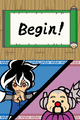 The screen transition for starting a technique.
 Screen for getting a technique correct.
 Screen for getting a technique incorrect.
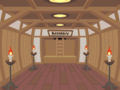 The inside of the dojo.


References[edit]
- ^ a b c d e In-game menu name, via WarioWare, Inc. → Assembly Dojo (29 Apr. 2009–30 Apr. 2010). WarioWare: D.I.Y. by Nintendo SPD and Intelligent Systems. Nintendo.
| Techniques in WarioWare: D.I.Y. | |
|---|---|
| Green set | Stick on Contact! • Drop Like a Rock! • Beep Beep Beep Ding! • Touch Anywhere To... • Victory Confetti • Thud! • Swap Magic! • All or Nothing |
| Blue set | Roll Down the Hill • Rocket Launch! • Go on Green! • Go on Green 2 • Deadly Spikes • Vanishing Magic • Perfect Fit! • Pick Any One |
| Yellow set | Count to Four • Don't Touch! • Once and Done • No Multi-Tapping! • Mid-Air Tap! • Back and Forth • Magnet and Ball • On, Then Off |
| Red set | Count to Eight • Round and Round • One-in-Three Chance • Random Direction • Right or Left • Shoo the Fly Away • Hit in Order • Odd Man Out |
| WarioWare: D.I.Y. | |
|---|---|
| Main characters | Wario • Dr. Crygor • Penny • Mona • Jimmy T. • Ashley • Red • Orbulon • 9-Volt |
| Minor characters | Abby • Young Cricket • Master Mantis • Baby Face • Mii • Credits aliens |
| Microgames | Strange • Sports • Food • IQ • Nintendo • Job Center • D.I.Y. 101 |
| Locations | D.I.Y. Shop • D.I.Y. Studio • WarioWare, Inc. (Job Center • Assembly Dojo) • Distribution Center • Options Garage |
| Other | Super MakerMatic 21 • D.I.Y. Forum • Record (list) • Comics • Medals • Bomb • Remix |
| Music | "Body Rock" • "F-Zero" • "GB Mario" • "Mario Kart" • "Mario Paint" • "Super Mario" • "Wario Land" • "Wreck. Crew" |
| Further information | Contests • Gallery • Iwata Asks • Jibun de Tsukuru Made in Ore Package • Multimedia • Shitsumon Corner • Staff |

