User:Nelsonic/BASICBOX
Heart
The title of this article is official, but it comes from a Japanese source.
If an acceptable English name is found, then the article should be moved to the new title.
| BASICBOX | |
|---|---|

| |
| Appears in | Family BASIC V3 |
Heart is the first of four minigames available with Family BASIC V3. The game is accessed by writing "GAME 0" on the programming screen and pressing the "RETURN" key.
Gameplay
Upon starting the game, the player is presented with an outline of a red heart made of red dots. To fill in the outline, players must speak or blow into the microphone on the Family Computer's game controller. One side of the heart is filled in at a time; the left side is filled in first, followed by the right. In addition, the player's score increases with each dot. Once the heart is filled in completely, the player's score will be around 338. After this, Pauline and Mario will come together from opposite sides of the screen, during which the player's score will rapidly increase. Once the two reach each other, the player's score will be at 449, the background will turn red, and the heart will flash pink. In addition, the word "Perfect" will appear in the middle of the heart.
Names in other languages
| Language | Name | Meaning | Note(s) | Ref. |
|---|---|---|---|---|
| Japanese | ハート Haato | Heart | [1] |
References
{FB} [Category:Minigames] [Category:Family BASIC]
Penpen Maze
| BASICBOX | |
|---|---|

| |
| Appears in | Family BASIC V3 |
Penpen Maze is one of four minigames available with Family BASIC V3. The game is accessed by writing "GAME 1" on the programming screen and then pressing the "RETURN" key.
Gameplay
Players must start the game by pressing the "F2" key. Upon starting the game, the player controls Penpen, a small blue penguin. The object of the game is to collect a series of numbers that spawn in a random order on a blue grid to increase the player's score, while avoiding two Sidesteppers that walk around the grid. If the player touches one of the Sidesteppers, the game ends and the player must restart from the beginning. Penpen starts the game with four traps in a shape similar to that of an eggshell that can be placed to temporarily stun the Sidesteppers. Upon collecting a number, a small flag appears in its place. Once Penpen collects all of the numbers, the game ends and the player has the option to play again.
Names in other languages
| Language | Name | Meaning | Note(s) | Ref. |
|---|---|---|---|---|
| Japanese | ペンペン迷路 Penpen Meiro | Penpen Maze | [1] |
Notes
- In order to collect a number, the player must completely stop moving after Penpen overlaps with the number tile. This does not always work, meaning Penpen will not always collect the number after stopping on it.
References
{FB} [Category:Minigames] [Category:Family BASIC]
Star Killer
| BASICBOX | |
|---|---|

| |
| Appears in | Family BASIC V3 |
Star Killer is one of four minigames available with Family BASIC V3. The game is accessed by writing "GAME 3" on the programming screen and then pressing the "RETURN" key.
Gameplay
The game functions as an endless shooter, with the object of the game being to survive. Players control one of two spaceships, referred to as Star Killer and Starship, respectively. Up to two players can play, and both players have the ability to shoot each other. If only one player plays, the other spaceship will be controlled by the computer. Enemies the player must avoid include Spinners, Fighterflies, Fireballs, and Achilleses. If the player shoots any of the aforementioned enemies, the enemies will explode; however, the player will explode if they run into one of the enemies. If the player is shot by the computer, they will also explode. After the player dies, their score and what "Level" they reached will be shown below the playing field.
Names in other languages
| Language | Name | Meaning | Note(s) | Ref. |
|---|---|---|---|---|
| Japanese | スターキラー Sutā Kirā | Star Killer | [1] |
References
{FB}
[Category:Minigames] [Category:Family BASIC]
Mario World
The title of this article is official, but it comes from a Japanese source.
If an acceptable English name is found, then the article should be moved to the new title.
| BASICBOX | |
|---|---|

| |
| Appears in | Family BASIC V3 |
Mario World is one of four minigames available with Family BASIC V3. The game is accessible by typing "GAME 2" on the programming screen, followed by pressing the "RETURN" key. However, none of the platforms will load (causing the player to die nearly instantly and result in a Game Over) unless the player types "GAME 2,1" on the programming screen.
Gameplay
The player takes control of Mario, and is given 800 units of time to collect a series of numbers in sequential order, in addition to multiple apples. Doing so increases the player's score. The player must climb ladders to reach certain numbers and apples, though they can also use the wrap-around screen in order to reach numbers and apples on the opposite side of the screen. While the player collects the numbers and apples, they must also avoid the two Nitanitas, as touching one instantly kills the player and results in a Game Over. Upon dying, the player's current score will be saved as their high score.
Names in other languages
| Language | Name | Meaning | Note(s) | Ref. |
|---|---|---|---|---|
| Japanese | マリオワールド Mario Wārudo | Mario World | [1] |
Notes
- Unlike Penpen Maze, the numbers that Mario must collect do not appear to spawn in a random order. For instance, six and zero always seem to spawn on the bottom of the screen, while nine always seems to spawn on the highest platform.
References
{FB}
[Category:Minigames] [Category:Family BASIC]
UFO
The title of this article is official, but it comes from a Japanese source.
If an acceptable English name is found, then the article should be moved to the new title.
| BASICBOX | |
|---|---|

| |
| Appears in | Family BASIC |
UFO is one of eight sample minigames included with Family BASIC. The manual provides instructions on how to code the game, in addition to a screenshot of the game.
Gameplay
The player takes control of a spaceship at the bottom of the screen, and the object of the game is to shoot the Fighter Fly flying progressively faster around the screen. Each time the player successfully shoots the Fighter Fly, the fly flashes blue and ten points are added to the player's score. However, the Fighter Fly can also shoot at the player, meaning the player must dodge as they shoot. If the player is hit by a shot from the Fighter Fly, the game immediately ends.
Names in other languages
| Language | Name | Meaning | Note(s) | Ref. |
|---|---|---|---|---|
| Japanese | UFO | - | [1] |
Notes
- The game is also included within side A04 of the Famicom Data Recorder Tape, which comes within the Family BASIC package.
References
{FB}
[Category:Minigames] [Category:Family BASIC]
Turtle
The title of this article is official, but it comes from a Japanese source.
If an acceptable English name is found, then the article should be moved to the new title.
| BASICBOX | |
|---|---|

| |
| Appears in | Family BASIC |
Turtle is one of eight sample minigames included with Family BASIC. The manual provides instructions on how to code the game, in addition to a screenshot of the game.
Gameplay
Upon starting the game, the player must choose from five different Shellcreepers to bet on; it appears that the player can bet on two out of the five. After the player has made their choice, the Shellcreepers will begin racing. During the race, the player must encourage the Shellcreepers they bet on by "cheering them on". Depending on which Shellcreeper crosses the finish line first, the player will either win or lose, and be prompted to try again. The game's code shows that the movement of the Shellcreepers is randomized.
Names in other languages
| Language | Name | Meaning | Note(s) | Ref. |
|---|---|---|---|---|
| Japanese | Turtle | - | [1] |
Notes
- The game appears to either have multiple rounds or consider restarting the game to be a new round, as text in the bottom left corner of the screen asks the player if they want to practice for "frame 2".
References
{FB}
[Category:Minigames] [Category:Family BASIC]
Kani-tori Game
The title of this article is official, but it comes from a Japanese source.
If an acceptable English name is found, then the article should be moved to the new title.
| BASICBOX | |
|---|---|

| |
| Appears in | Family BASIC V3 |
Kani-tori Game is a minigame playable in Family BASIC V3. Instructions to code the minigame were published by Hudson Soft in the magazine Nintendo no Family BASIC Nyūmon.
Gameplay
Upon starting the game, players control Mario and must shoot at a blue Sidestepper that progressively moves further and further down the screen. Once the Sidestepper reaches the edge of the screen, it moves downward. Every time Mario shoots the Sidestepper successfully, he gains 50 points. If the Sidestepper shoots Mario, Mario loses one of his three lives. Mario also dies instantly if the Sidestepper touches him. The game does not appear to have an ending, as the only way to progress past the gameplay screen is is Mario dies. This brings up a screen showing the player's score and allowing them to play the minigame again.
Names in other languages
| Language | Name | Meaning | Note(s) | Ref. |
|---|---|---|---|---|
| Japanese | カニとりゲーム Kani-tori Gēmu | Crab-catching Game | [1] |
References
{FB}
[Category:Minigames] [Category:Family BASIC]
Moon Base 2
The title of this article is official, but it comes from a Japanese source.
If an acceptable English name is found, then the article should be moved to the new title.
| BASICBOX | |
|---|---|

| |
| Appears in | Family BASIC V3 |
Moon Base 2 is a minigame playable in Family BASIC V3. Instructions to code the minigame were published by Hudson Soft in the magazine Nintendo no Family BASIC Nyūmon.
Gameplay
The player controls Mario, with the object of the game being for the player to shoot as many ships as they can. Mario is unable to move, and the only action the player can make Mario do is shoot. Each time the player successfully hits a ship, 50 points are added to their score. Unlike Kani-tori Game, the ships do not shoot at or damage Mario. The player is given 30 shots to hit as many ships as they can, though the game registers a "zeroth" shot before it ends.
Names in other languages
| Language | Name | Meaning | Note(s) | Ref. |
|---|---|---|---|---|
| Japanese | ムーンベース2 Mūn Bēsu 2 | Moon Base 2 | [1] |
References
{FB} [Category:Minigames] [Category:Family BASIC]
Mario Shooter
The title of this article is official, but it comes from a Japanese source.
If an acceptable English name is found, then the article should be moved to the new title.
| BASICBOX | |
|---|---|

| |
| Appears in | Family BASIC V3 |
Mario Shooter is a minigame playable in Family BASIC V3. Instructions to code the minigame were published by Hudson Soft in the magazine Nintendo no Family BASIC Nyūmon.
Gameplay
The player controls Mario, with the object of the game being to shoot each of the Fighter Flies and Fires that come down from the top of the screen. This is done by using the walls to ricochet Mario's shot into the enemy. Every time Mario hits one of the enemies, 50 points are added to his score. Unlike Kani-tori Game, the enemies do not damage Mario if they reach the bottom of the screen before he hits them. Instead, they just despawn. The player is given 30 shots to hit as many enemies as they can.
Names in other languages
| Language | Name | Meaning | Note(s) | Ref. |
|---|---|---|---|---|
| Japanese | マリオシューター Mario Shūtā | Mario Shooter | [1] |
Notes
- Despite the player being given only 30 shots, the player can shoot two additional times, causing the counter to go to zero and then to negative one. After the counter reaches the latter, the game abruptly ends.
- Like each Family BASIC shooter minigame Hudson released, Mario is only able to shoot once until his previous shot goes offscreen.
References
{FB}
[Category:Minigames] [Category:Family BASIC]
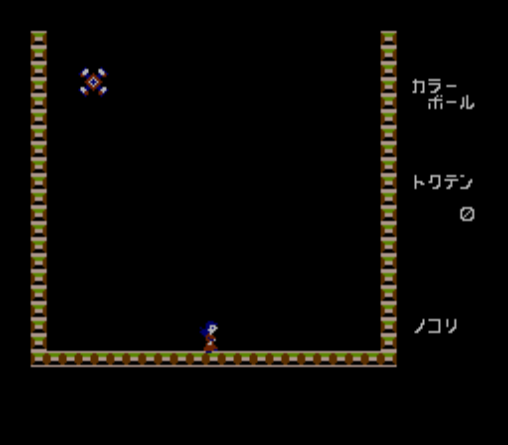
Color Ball
The title of this article is official, but it comes from a Japanese source.
If an acceptable English name is found, then the article should be moved to the new title.
| BASICBOX | |
|---|---|

| |
| Appears in | Family BASIC V3 |
Color Ball is a minigame playable in Family BASIC V3. Instructions to code the minigame were provided in Nintendo Family Computer Series: Lode Runner, a magazine published by Hudson Soft.
Gameplay
Players control Lady, marking her first playable appearance. The object of the game is to both avoid and get rid of a progressively larger amount of bouncing objects that switch sprites the longer they bounce. To avoid the objects, Lady must simply walk underneath them. To get rid of them, players must press  , which will cause a Shellcreeper to spawn in front of Lady. If the objects touch this Shellcreeper, they will cycle back one sprite and bounce higher; upon spawning, the sprite uses that of the Spinner, followed by Penpen, followed by a Fighter Fly, followed by a Fire. If the sprite touches the Shellcreeper while it is on the Spinner sprite, it will switch to that of Nitanita. If it touches the Shellcreeper one more time, it will switch to that of Achilles and fly off the screen. Each time the player gets one of the sprites to switch to Achilles, points are added to their score. The game contains multiple levels, with each level featuring more objects the player must get to leave the screen; each level, however, the objects grow progressively slower to compensate for the difficulty increase.
Names in other languages
| Language | Name | Meaning | Note(s) | Ref. |
|---|---|---|---|---|
| Japanese | カラー ボール Karā Bōru | Color Ball | [1] |
References
{FB} [Category:Minigames] [Category:Family BASIC]
Fire Kyūjotai
The title of this article is official, but it comes from a Japanese source.
If an acceptable English name is found, then the article should be moved to the new title.
| BASICBOX | |
|---|---|

| |
| Appears in | Family BASIC V3 |
Fire Kyūjotai is a minigame playable in Family BASIC V3. instructions to code the game were published by [Natsumesha]] in the licensed magazine Family Computer Original Game-shū 25.
Gameplay
The game plays similarly to Fire. The player plays as a platform at the bottom of the screen, and the object of the game is to get each Mario jumping from the top of the building (at which there is a sign reading "OIL" and a Fire enemy) into the ambulance at the other side of the screen. Like the Game & Watch game, the game starts off with one Mario and the amount of Marios that the player must bounce gradually increases. If the player drops one of the Marios, the game immediately ends and the player is given the option to try again.
Names in other languages
| Language | Name | Meaning | Note(s) | Ref. |
|---|---|---|---|---|
| Japanese | ファイヤー救助隊 Faiyā Kyūjotai | Fire Rescue Team | [1] |
References
{FB}
[Category:Minigames] [Category:Family BASIC]
| Family BASIC / Family BASIC V3 | ||
|---|---|---|
| Sprites | Mario • Lady • Shellcreeper • Sidestepper • Fighter Fly • Fireball • Bird • Penpen • Star Killer • Starship • Spinner • Achilles • Nitanita | |
| Minigames | Hearta • Mario Worlda • Penpen Mazea • Star Killera • Turtleb • UFOb | |
| Third-party minigames | BIO-TECH • Color Ball • Daimajin Attack • Driller Tank • Dungeon & Mario • Fire Kyūjotai • Kani-tori Game • Keyboard Lesson • Mario Shooter • Moon Base 2 • Starship | |
| Magazines | Family Computer Original Game-shū 25 • Family Computer Secret Game Kōryaku Techniques • Nintendo no Family BASIC Nyūmon • Nintendo Family Computer Series: Lode Runner | |
[Category:Navbox templates]